Next: Introduction, Up: (dir) [Contents][Index]
GNU Libidn
This manual is last updated 12 January 2024 for version 1.42 of GNU Libidn.
Copyright © 2002–2024 Simon Josefsson.
Permission is granted to copy, distribute and/or modify this document under the terms of the GNU Free Documentation License, Version 1.3 or any later version published by the Free Software Foundation; with no Invariant Sections, no Front-Cover Texts, and no Back-Cover Texts. A copy of the license is included in the section entitled “GNU Free Documentation License”.
Table of Contents
- 1 Introduction
- 2 Preparation
- 3 Utility Functions
- 4 Stringprep Functions
- 5 Punycode Functions
- 6 IDNA Functions
- 7 TLD Functions
- 8 PR29 Functions
- 9 Examples
- 10 Invoking idn
- 11 Emacs API
- 12 Java API
- 13 C# API
- 14 Acknowledgements
- 15 History
- Appendix A PR29 discussion
- Appendix B On Label Separators
- Appendix C GNU Free Documentation License
- Function and Variable Index
- Concept Index
Next: Preparation, Previous: GNU Libidn, Up: GNU Libidn [Contents][Index]
1 Introduction
GNU Libidn is a fully documented implementation of the Stringprep, Punycode and IDNA specifications. Libidn’s purpose is to encode and decode internationalized domain name strings. There are native C, C# and Java libraries.
The C library contains a generic Stringprep implementation. Profiles for Nameprep, iSCSI, SASL, XMPP and Kerberos V5 are included. Punycode and ASCII Compatible Encoding (ACE) via IDNA are supported. A mechanism to define Top-Level Domain (TLD) specific validation tables, and to compare strings against those tables, is included. Default tables for some TLDs are also included.
The Stringprep API consists of two main functions, one for converting data from the system’s native representation into UTF-8, and one function to perform the Stringprep processing. Adding a new Stringprep profile for your application within the API is straightforward. The Punycode API consists of one encoding function and one decoding function. The IDNA API consists of the ToASCII and ToUnicode functions, as well as an high-level interface for converting entire domain names to and from the ACE encoded form. The TLD API consists of one set of functions to extract the TLD name from a domain string, one set of functions to locate the proper TLD table to use based on the TLD name, and core functions to validate a string against a TLD table, and some utility wrappers to perform all the steps in one call.
The library is used by, e.g., GNU SASL and Shishi to process user names and passwords. Libidn can be built into GNU Libc to enable a new system-wide getaddrinfo flag for IDN processing.
Libidn is developed for the GNU/Linux system, but runs on over 20 Unix platforms (including Solaris, IRIX, AIX, and Tru64) and Windows. The library is written in C and (parts of) the API is also accessible from C++, Emacs Lisp, Python and Java. A native Java and C# port is included.
Also included is a command line tool, several self tests, code examples, and more.
- Getting Started
- Features
- Library Overview
- Supported Platforms
- Getting help
- Commercial Support
- Downloading and Installing
- Bug Reports
- Contributing
Next: Features, Up: Introduction [Contents][Index]
1.1 Getting Started
This manual documents the library programming interface. All functions and data types provided by the library are explained. Included are also examples, and documentation for the command line tool idn that provide a quick interface to the library. The Emacs Lisp bindings for the library is also discussed.
The reader is assumed to possess basic familiarity with internationalization concepts and network programming in C or C++.
This manual can be used in several ways. If read from the beginning to the end, it gives a good introduction into the library and how it can be used in an application. Forward references are included where necessary. Later on, the manual can be used as a reference manual to get just the information needed about any particular interface of the library. Experienced programmers might want to start looking at the examples at the end of the manual (see Examples), and then only read up those parts of the interface which are unclear.
Next: Library Overview, Previous: Getting Started, Up: Introduction [Contents][Index]
1.2 Features
This library might have a couple of advantages over other libraries doing a similar job.
- It’s Free Software
Anybody can use, modify, and redistribute it under the terms of a free software license.
- It’s thread-safe
No global state is kept in the library. All functions are re-entrant.
- It’s portable
The code is intended to be written in pure ANSI C89. It has been tested on many Unix like operating systems, and Windows.
- It’s modularized
The library is composed of several modules, and the only interaction between modules is through each modules’ public API. If you only need one piece of functionality, it is possible to take the files you need and incorporate them into your own project.
- It’s not bloated
The design of the library is based on the smallest API necessary to implement the basic functionality. It has been carefully extended with a small number of high-level wrappers to make it comfortable to use the library. However, it does not implement additional functionality just for the sake of completeness.
- It’s documented
Sadly, not all software comes with documentation these days. This one does.
Next: Supported Platforms, Previous: Features, Up: Introduction [Contents][Index]
1.3 Library Overview
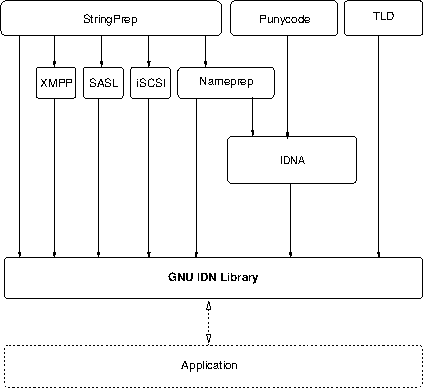
The following illustration show the components that make up Libidn, and how your application relates to the library. In the illustration, various components are shown as boxes. You see the generic StringPrep component, the various StringPrep profiles including Nameprep, the Punycode component, the IDNA component, and the TLD component. The arrows indicate aggregation, e.g., IDNA uses Punycode and Nameprep, and in turn Nameprep uses the generic StringPrep interface. The interfaces to all components are available for applications, no component within the library is hidden from the application.
Next: Getting help, Previous: Library Overview, Up: Introduction [Contents][Index]
1.4 Supported Platforms
Libidn has at some point in time been tested on the following platforms. Build reports for each platforms and Libidn version is available at http://autobuild.josefsson.org/libidn/.
- Debian GNU/Linux 3.0 (Woody)
GCC 2.95.4 and GNU Make. This is the main development platform.
alphaev67-unknown-linux-gnu,alphaev6-unknown-linux-gnu,arm-unknown-linux-gnu,armv4l-unknown-linux-gnu,hppa-unknown-linux-gnu,hppa64-unknown-linux-gnu,i686-pc-linux-gnu,ia64-unknown-linux-gnu,m68k-unknown-linux-gnu,mips-unknown-linux-gnu,mipsel-unknown-linux-gnu,powerpc-unknown-linux-gnu,s390-ibm-linux-gnu,sparc-unknown-linux-gnu,sparc64-unknown-linux-gnu. - Debian GNU/Linux 2.1
GCC 2.95.1 and GNU Make.
armv4l-unknown-linux-gnu. - Tru64 UNIX
Tru64 UNIX C compiler and Tru64 Make.
alphaev67-dec-osf5.1,alphaev68-dec-osf5.1. - SuSE Linux 7.1
GCC 2.96 and GNU Make.
alphaev6-unknown-linux-gnu,alphaev67-unknown-linux-gnu. - SuSE Linux 7.2a
GCC 3.0 and GNU Make.
ia64-unknown-linux-gnu. - SuSE Linux
GCC 3.2.2 and GNU Make.
x86_64-unknown-linux-gnu(AMD64 Opteron “Melody”). - SuSE Enterprise Server 9 on IBM OpenPower 720
GCC 3.3.3 and GNU Make.
powerpc64-unknown-linux-gnu. - RedHat Linux 7.2
GCC 2.96 and GNU Make.
alphaev6-unknown-linux-gnu,alphaev67-unknown-linux-gnu,ia64-unknown-linux-gnu. - RedHat Linux 8.0
GCC 3.2 and GNU Make.
i686-pc-linux-gnu. - RedHat Advanced Server 2.1
GCC 2.96 and GNU Make.
i686-pc-linux-gnu. - Slackware Linux 8.0.01
GCC 2.95.3 and GNU Make.
i686-pc-linux-gnu. - Mandrake Linux 9.0
GCC 3.2 and GNU Make.
i686-pc-linux-gnu. - IRIX 6.5
MIPS C compiler, IRIX Make.
mips-sgi-irix6.5. - AIX 4.3.2
IBM C for AIX compiler, AIX Make.
rs6000-ibm-aix4.3.2.0. - Microsoft Windows 2000 (Cygwin)
GCC 3.2, GNU make.
i686-pc-cygwin. - HP-UX 11
HP-UX C compiler and HP Make.
ia64-hp-hpux11.22,hppa2.0w-hp-hpux11.11. - SUN Solaris 2.7
GCC 3.0.4 and GNU Make.
sparc-sun-solaris2.7. - SUN Solaris 2.8
Sun WorkShop Compiler C 6.0 and SUN Make.
sparc-sun-solaris2.8. - SUN Solaris 2.9
Sun Forte Developer 7 C compiler and GNU Make.
sparc-sun-solaris2.9. - NetBSD 1.6
GCC 2.95.3 and GNU Make.
alpha-unknown-netbsd1.6,i386-unknown-netbsdelf1.6. - OpenBSD 3.1 and 3.2
GCC 2.95.3 and GNU Make.
alpha-unknown-openbsd3.1,i386-unknown-openbsd3.1. - FreeBSD 4.7 and 4.8
GCC 2.95.4 and GNU Make.
alpha-unknown-freebsd4.7,alpha-unknown-freebsd4.8,i386-unknown-freebsd4.7,i386-unknown-freebsd4.8. - MacOS X 10.2 Server Edition
GCC 3.1 and GNU Make.
powerpc-apple-darwin6.5. - MacOS X 10.4 “Tiger” with Xcode 2.0
GCC 4.0 and GNU Make.
powerpc-apple-darwin8.0. - Cross compiled to uClinux/uClibc on Motorola Coldfire
GCC 3.4 and GNU Make
m68k-uclinux-elf. - Cross compiled to ARM using Glibc
GCC 2.95 and GNU Make
arm-linux. - Cross compiled to Mingw32.
GCC 3.4.4 and GNU Make
i586-mingw32msvc. - OS/2
GCC.
If you use Libidn on, or port Libidn to, a new platform please report it to the author.
Next: Commercial Support, Previous: Supported Platforms, Up: Introduction [Contents][Index]
1.5 Getting help
A mailing list where users of Libidn may help each other exists, and you can reach it by sending e-mail to help-libidn@gnu.org. Archives of the mailing list discussions, and an interface to manage subscriptions, is available through the World Wide Web at http://lists.gnu.org/mailman/listinfo/help-libidn.
Next: Downloading and Installing, Previous: Getting help, Up: Introduction [Contents][Index]
1.6 Commercial Support
Commercial support is available for users of GNU Libidn. The kind of support that can be purchased may include:
- Implement new features. Such as country code specific profiling to support a restricted subset of Unicode.
- Port Libidn to new platforms. This could include porting Libidn to an embedded platforms that may need memory or size optimization.
- Integrating IDN support in your existing project.
- System design of components related to IDN.
If you are interested, please write to:
Simon Josefsson Datakonsult AB
Hagagatan 24
113 47 Stockholm
Sweden

E-mail: simon@josefsson.org
If your company provides support related to GNU Libidn and would like to be mentioned here, contact the author (see Bug Reports).
Next: Bug Reports, Previous: Commercial Support, Up: Introduction [Contents][Index]
1.7 Downloading and Installing
The package can be downloaded from several places, including:
ftp://alpha.gnu.org/pub/gnu/libidn/
The latest version is stored in a file, e.g., ‘libidn-1.42.tar.gz’ where the ‘1.42’ value is the highest version number in the directory.
The package is then extracted, configured and built like many other packages that use Autoconf. For detailed information on configuring and building it, refer to the INSTALL file that is part of the distribution archive.
Here is an example terminal session that download, configure, build and install the package. You will need a few basic tools, such as ‘sh’, ‘make’ and ‘cc’.
$ wget -q ftp://alpha.gnu.org/pub/gnu/libidn/libidn-1.42.tar.gz
$ tar xfz libidn-1.42.tar.gz
$ cd libidn-1.42/
$ ./configure
...
$ make
...
$ make install
...
After that Libidn should be properly installed and ready for use.
A few configure options may be relevant, summarized in the
table.
--enable-javaBuild the Java port into a *.JAR file. See Java API, for more information.
--disable-tldDisable the TLD module. This would typically only be useful if you are building on a memory restricted platforms. See TLD Functions, for more information.
--enable-csharp[=IMPL]Build the
C#port into a*.DLLfile. See C# API, for more information. Here,IMPLispnetormono, indicating whether the PNETcscccompiler or the Monomcscompiler should be used, respectively.--disable-valgrind-testsDisable running the self-checks under Valgrind (http://valgrind.org/). Normally Valgrind does not cause problems and can detect some severe memory errors. If you are getting errors from Valgrind that are caused by the compiler or libc (possibly as a result of special optimization flags), you may use this option to disable the use of Valgrind.
For the complete list, refer to the output from configure
--help.
1.7.1 Installing under Windows
There are two ways to build Libidn on Windows: via MinGW or via Visual Studio.
With MinGW, you can build a Libidn DLL and use it from other applications. After installing MinGW (http://mingw.org/) follow the generic installation instructions (see Downloading and Installing). The DLL is installed by default.
For information on how to use the DLL in other applications, see: http://www.mingw.org/mingwfaq.shtml#faq-msvcdll.
You can build Libidn as a native Visual Studio C++ project. This allows you to build the code for other platforms that VS supports, such as Windows Mobile. You need Visual Studio 2005 or later.
First download and unpack the archive as described in the generic
installation instructions (see Downloading and Installing). Don’t
run ./configure. Instead, start Visual Studio and open the
project file windows/libidn.sln inside the Libidn directory. You
should be able to build the project using Build Project.
Output libraries will be written into the windows/lib (or
windows/lib/debug for Debug versions) folder.
When working with Windows you may want to look into the special memory handling functions that may be needed (see Memory handling under Windows).
Next: Contributing, Previous: Downloading and Installing, Up: Introduction [Contents][Index]
1.8 Bug Reports
If you think you have found a bug in Libidn, please investigate it and report it.
- Please make sure that the bug is really in Libidn, and preferably also check that it hasn’t already been fixed in the latest version.
- You have to send us a test case that makes it possible for us to reproduce the bug.
- You also have to explain what is wrong; if you get a crash, or if the results printed are not good and in that case, in what way. Make sure that the bug report includes all information you would need to fix this kind of bug for someone else.
Please make an effort to produce a self-contained report, with something definite that can be tested or debugged. Vague queries or piecemeal messages are difficult to act on and don’t help the development effort.
If your bug report is good, we will do our best to help you to get a corrected version of the software; if the bug report is poor, we won’t do anything about it (apart from asking you to send better bug reports).
If you think something in this manual is unclear, or downright incorrect, or if the language needs to be improved, please also send a note.
Send your bug report to:
Previous: Bug Reports, Up: Introduction [Contents][Index]
1.9 Contributing
If you want to submit a patch for inclusion – from solve a typo you discovered, up to adding support for a new feature – you should submit it as a bug report (see Bug Reports). There are some things that you can do to increase the chances for it to be included in the official package.
Unless your patch is very small (say, under 10 lines) we require that you assign the copyright of your work to the Free Software Foundation. This is to protect the freedom of the project. If you have not already signed papers, we will send you the necessary information when you submit your contribution.
For contributions that doesn’t consist of actual programming code, the only guidelines are common sense. Use it.
For code contributions, a number of style guides will help you:
- Coding Style.
Follow the GNU Standards document (see (standards)GNU Coding Standards).
If you normally code using another coding standard, there is no problem, but you should use ‘indent’ to reformat the code (see (indent)GNU Indent) before submitting your work.
- Use the unified diff format ‘diff -u’.
- Return errors. No reason whatsoever should abort the execution of the library. Even memory allocation errors, e.g. when malloc return NULL, should work although result in an error code.
- Design with thread safety in mind. Don’t use global variables and the like.
- Avoid using the C math library. It causes problems for embedded implementations, and in most situations it is very easy to avoid using it.
- Document your functions. Use comments before each function headers, that, if properly formatted, are extracted into GTK-DOC web pages. Don’t forget to update the Texinfo manual as well.
- Supply a ChangeLog and NEWS entries, where appropriate.
Next: Utility Functions, Previous: Introduction, Up: GNU Libidn [Contents][Index]
2 Preparation
To use ‘Libidn’, you have to perform some changes to your sources and the build system. The necessary changes are small and explained in the following sections. At the end of this chapter, it is described how the library is initialized, and how the requirements of the library are verified.
A faster way to find out how to adapt your application for use with ‘Libidn’ may be to look at the examples at the end of this manual (see Examples).
- Header
- Initialization
- Version Check
- Building the source
- Autoconf tests
- Memory handling under Windows
- Header file
idn-free.h - Memory de-allocation function
Next: Initialization, Up: Preparation [Contents][Index]
2.1 Header
The library contains a few independent parts, and each part export the interfaces (data types and functions) in a header file. You must include the appropriate header files in all programs using the library, either directly or through some other header file, like this:
#include <stringprep.h>
The header files and the functions they define are categorized as follows:
- stringprep.h
-
The low-level stringprep API entry point. For IDN applications, this is usually invoked via IDNA. Some applications, specifically non-IDN ones, may want to prepare strings directly though, and should include this header file.
The name space of the stringprep part of Libidn is
stringprep*for function names,Stringprep*for data types andSTRINGPREP_*for other symbols. In addition,_stringprep*is reserved for internal use and should never be used by applications. - punycode.h
-
The entry point to Punycode encoding and decoding functions. Normally punycode is used via the idna.h interface, but some application may want to perform raw punycode operations.
The name space of the punycode part of Libidn is
punycode_*for function names,Punycode*for data types andPUNYCODE_*for other symbols. In addition,_punycode*is reserved for internal use and should never be used by applications. - idna.h
-
The entry point to the IDNA functions. This is the normal entry point for applications that need IDN functionality.
The name space of the IDNA part of Libidn is
idna_*for function names,Idna*for data types andIDNA_*for other symbols. In addition,_idna*is reserved for internal use and should never be used by applications. - tld.h
-
The entry point to the TLD functions. Normal applications are not expected to need this functionality, but it is present for applications that are used by TLDs to validate customer input.
The name space of the TLD part of Libidn is
tld_*for function names,Tld_*for data types andTLD_*for other symbols. In addition,_tld*is reserved for internal use and should never be used by applications. - pr29.h
-
The entry point to the PR29 functions. These functions are used to detect “problem sequences” (see PR29 Functions), mostly for use in security critical applications.
The name space of the PR29 part of Libidn is
pr29_*for function names,Pr29_*for data types andPR29_*for other symbols. In addition,_pr29*is reserved for internal use and should never be used by applications. - idn-free.h
-
The entry point to the Windows memory de-allocation function (see Memory handling under Windows). It contains only one function
idn_free.
All header files defined and use the symbol IDNAPI to decorate
the API functions.
Next: Version Check, Previous: Header, Up: Preparation [Contents][Index]
2.2 Initialization
Libidn is stateless and does not need any initialization.
Next: Building the source, Previous: Initialization, Up: Preparation [Contents][Index]
2.3 Version Check
It is often desirable to check that the version of ‘Libidn’ used is indeed one which fits all requirements. Even with binary compatibility new features may have been introduced but due to problem with the dynamic linker an old version is actually used. So you may want to check that the version is okay right after program startup.
stringprep_check_version
- Function: const char * stringprep_check_version (const char * req_version) 
req_version: Required version number, or NULL.
Check that the version of the library is at minimum the requested one and return the version string; return NULL if the condition is not satisfied. If a NULL is passed to this function, no check is done, but the version string is simply returned.
See
STRINGPREP_VERSIONfor a suitablereq_versionstring.Return value: Version string of run-time library, or NULL if the run-time library does not meet the required version number.
The normal way to use the function is to put something similar to the
following first in your main:
  if (!stringprep_check_version (STRINGPREP_VERSION))
    {
      printf ("stringprep_check_version() failed:\n"
              "Header file incompatible with shared library.\n");
      exit(EXIT_FAILURE);
    }
Next: Autoconf tests, Previous: Version Check, Up: Preparation [Contents][Index]
2.4 Building the source
If you want to compile a source file including e.g. the ‘idna.h’ header file, you must make sure that the compiler can find it in the directory hierarchy. This is accomplished by adding the path to the directory in which the header file is located to the compilers include file search path (via the -I option).
However, the path to the include file is determined at the time the
source is configured. To solve this problem, ‘Libidn’ uses the
external package pkg-config that knows the path to the
include file and other configuration options. The options that need
to be added to the compiler invocation at compile time are output by
the --cflags option to pkg-config libidn. The
following example shows how it can be used at the command line:
gcc -c foo.c `pkg-config libidn --cflags`
Adding the output of ‘pkg-config libidn --cflags’ to the compilers command line will ensure that the compiler can find e.g. the idna.h header file.
A similar problem occurs when linking the program with the library.
Again, the compiler has to find the library files. For this to work,
the path to the library files has to be added to the library search
path (via the -L option). For this, the option
--libs to pkg-config libidn can be used. For
convenience, this option also outputs all other options that are
required to link the program with the ‘libidn’ library. The example
shows how to link foo.o with the ‘libidn’ library to a program
foo.
gcc -o foo foo.o `pkg-config libidn --libs`
Of course you can also combine both examples to a single command by
specifying both options to pkg-config:
gcc -o foo foo.c `pkg-config libidn --cflags --libs`
Next: Memory handling under Windows, Previous: Building the source, Up: Preparation [Contents][Index]
2.5 Autoconf tests
If your project uses Autoconf (see (autoconf)GNU Autoconf)
to check for installed libraries, you might find the following snippet
illustrative. It add a new configure parameter
--with-libidn, and check for idna.h and ‘-lidn’
(possibly below the directory specified as the optional argument to
--with-libidn), and define the CPP symbol LIBIDN if the
library is found. The default behaviour is to search for the library
and enable the functionality (that is, define the symbol) when the
library is found, but if you wish to make the default behaviour of
your package be that Libidn is not used (even if it is installed on
the system), change ‘libidn=yes’ to ‘libidn=no’ on the third
line.
AC_ARG_WITH(libidn, AS_HELP_STRING([--with-libidn=[DIR]],
                                [Support IDN (needs GNU Libidn)]),
  libidn=$withval, libidn=yes)
if test "$libidn" != "no"; then
  if test "$libidn" != "yes"; then
    LDFLAGS="${LDFLAGS} -L$libidn/lib"
    CPPFLAGS="${CPPFLAGS} -I$libidn/include"
  fi
  AC_CHECK_HEADER(idna.h,
    AC_CHECK_LIB(idn, stringprep_check_version,
      [libidn=yes LIBS="${LIBS} -lidn"], libidn=no),
    libidn=no)
fi
if test "$libidn" != "no" ; then
  AC_DEFINE(LIBIDN, 1, [Define to 1 if you want IDN support.])
else
  AC_MSG_WARN([Libidn not found])
fi
AC_MSG_CHECKING([if Libidn should be used])
AC_MSG_RESULT($libidn)
If you require that your users have installed pkg-config (which
I cannot recommend generally), the above can be done more easily as
follows.
AC_ARG_WITH(libidn, AS_HELP_STRING([--with-libidn=[DIR]],
                                [Support IDN (needs GNU Libidn)]),
  libidn=$withval, libidn=yes)
if test "$libidn" != "no" ; then
  PKG_CHECK_MODULES(LIBIDN, libidn >= 0.0.0, [libidn=yes], [libidn=no])
  if test "$libidn" != "yes" ; then
    libidn=no
    AC_MSG_WARN([Libidn not found])
  else
    libidn=yes
    AC_DEFINE(LIBIDN, 1, [Define to 1 if you want Libidn.])
  fi
fi
AC_MSG_CHECKING([if Libidn should be used])
AC_MSG_RESULT($libidn)
Previous: Autoconf tests, Up: Preparation [Contents][Index]
2.6 Memory handling under Windows
Several functions in the library allocates memory. The memory is
expected to be de-allocated using the free function. Under
Windows, it is sometimes necessary to de-allocate memory in the same
module that allocated a memory region. The reason is that different
modules use separate heap memory regions. To solve this problem we
provide a function to de-allocate memory inside the library.
Note that we do not recommend using this interface generally if you do not care about Windows portability.
2.7 Header file idn-free.h
To use the function explained in this chapter, you need to include the file idn-free.h using:
#include <idn-free.h>
2.8 Memory de-allocation function
idn_free
- Function: void idn_free (void * ptr) 
ptr: memory region to deallocate, or
NULL.Deallocates memory region by calling
free(). IfptrisNULLno operation is performed.Normally applications de-allocate strings allocated by libidn by calling
free()directly. Under Windows, different parts of the same application may use different heap memory, and then it is important to deallocate memory allocated within the same module that allocated it. This function makes that possible.
Next: Stringprep Functions, Previous: Preparation, Up: GNU Libidn [Contents][Index]
3 Utility Functions
The rest of this library makes extensive use of Unicode characters. In order to interface this library with the outside world, your application may need to make various Unicode transformations.
- Header file
stringprep.h - Unicode Encoding Transformation
- Unicode Normalization
- Character Set Conversion
3.1 Header file stringprep.h
To use the functions explained in this chapter, you need to include the file stringprep.h using:
#include <stringprep.h>
3.2 Unicode Encoding Transformation
stringprep_unichar_to_utf8
- Function: int stringprep_unichar_to_utf8 (uint32_t c, char * outbuf) 
c: a ISO10646 character code
outbuf: output buffer, must have at least 6 bytes of space. If
NULL, the length will be computed and returned and nothing will be written tooutbuf.Converts a single character to UTF-8.
Return value: number of bytes written.
stringprep_utf8_to_unichar
- Function: uint32_t stringprep_utf8_to_unichar (const char * p) 
p: a pointer to Unicode character encoded as UTF-8
Converts a sequence of bytes encoded as UTF-8 to a Unicode character. If
pdoes not point to a valid UTF-8 encoded character, results are undefined.Return value: the resulting character. Converts a sequence of bytes encoded as UTF-8 to a Unicode character. If
pdoes not point to a valid UTF-8 encoded character, results are undefined.Return value: the resulting character.
stringprep_ucs4_to_utf8
- Function: char * stringprep_ucs4_to_utf8 (const uint32_t * str, ssize_t len, size_t * items_read, size_t * items_written) 
str: a UCS-4 encoded string
len: the maximum length of
strto use. Iflen< 0, then the string is terminated with a 0 character.items_read: location to store number of characters read read, or
NULL.items_written: location to store number of bytes written or
NULL. The value here stored does not include the trailing 0 byte.Convert a string from a 32-bit fixed width representation as UCS-4. to UTF-8. The result will be terminated with a 0 byte.
Return value: a pointer to a newly allocated UTF-8 string. This value must be deallocated by the caller. If an error occurs,
NULLwill be returned.
stringprep_utf8_to_ucs4
- Function: uint32_t * stringprep_utf8_to_ucs4 (const char * str, ssize_t len, size_t * items_written) 
str: a UTF-8 encoded string
len: the maximum length of
strto use. Iflen< 0, then the string is nul-terminated.items_written: location to store the number of characters in the result, or
NULL.Convert a string from UTF-8 to a 32-bit fixed width representation as UCS-4. The function now performs error checking to verify that the input is valid UTF-8 (before it was documented to not do error checking).
Return value: a pointer to a newly allocated UCS-4 string. This value must be deallocated by the caller.
3.3 Unicode Normalization
stringprep_ucs4_nfkc_normalize
- Function: uint32_t * stringprep_ucs4_nfkc_normalize (const uint32_t * str, ssize_t len) 
str: a Unicode string.
len: length of
strarray, or -1 ifstris nul-terminated.Converts a UCS4 string into canonical form, see
stringprep_utf8_nfkc_normalize()for more information.Return value: a newly allocated Unicode string, that is the NFKC normalized form of
str.
stringprep_utf8_nfkc_normalize
- Function: char * stringprep_utf8_nfkc_normalize (const char * str, ssize_t len) 
str: a UTF-8 encoded string.
len: length of
str, in bytes, or -1 ifstris nul-terminated.Converts a string into canonical form, standardizing such issues as whether a character with an accent is represented as a base character and combining accent or as a single precomposed character.
The normalization mode is NFKC (ALL COMPOSE). It standardizes differences that do not affect the text content, such as the above-mentioned accent representation. It standardizes the "compatibility" characters in Unicode, such as SUPERSCRIPT THREE to the standard forms (in this case DIGIT THREE). Formatting information may be lost but for most text operations such characters should be considered the same. It returns a result with composed forms rather than a maximally decomposed form.
Return value: a newly allocated string, that is the NFKC normalized form of
str.
3.4 Character Set Conversion
stringprep_locale_charset
- Function: const char * stringprep_locale_charset ( void) 
Enumerated return codes of the TLD checking functions. The value 0 is guaranteed to always correspond to success.
: Find out current locale charset. The function respect the CHARSET environment variable, but typically uses nl_langinfo(CODESET) when it is supported. It fall back on "ASCII" if CHARSET isn’t set and nl_langinfo isn’t supported or return anything.
Note that this function return the application’s locale’s preferred charset (or thread’s locale’s preferred charset, if your system support thread-specific locales). It does not return what the system may be using. Thus, if you receive data from external sources you cannot in general use this function to guess what charset it is encoded in. Use stringprep_convert from the external representation into the charset returned by this function, to have data in the locale encoding.
Return value: Return the character set used by the current locale. It will never return NULL, but use "ASCII" as a fallback.
stringprep_convert
- Function: char * stringprep_convert (const char * str, const char * to_codeset, const char * from_codeset) 
str: input zero-terminated string.
to_codeset: name of destination character set.
from_codeset: name of origin character set, as used by
str.Convert the string from one character set to another using the system’s
iconv()function.Return value: Returns newly allocated zero-terminated string which is
strtranscoded into to_codeset.
stringprep_locale_to_utf8
- Function: char * stringprep_locale_to_utf8 (const char * str) 
str: input zero terminated string.
Convert string encoded in the locale’s character set into UTF-8 by using
stringprep_convert().Return value: Returns newly allocated zero-terminated string which is
strtranscoded into UTF-8.
stringprep_utf8_to_locale
- Function: char * stringprep_utf8_to_locale (const char * str) 
str: input zero terminated string.
Convert string encoded in UTF-8 into the locale’s character set by using
stringprep_convert().Return value: Returns newly allocated zero-terminated string which is
strtranscoded into the locale’s character set.
Next: Punycode Functions, Previous: Utility Functions, Up: GNU Libidn [Contents][Index]
4 Stringprep Functions
Stringprep describes a framework for preparing Unicode text strings in order to increase the likelihood that string input and string comparison work in ways that make sense for typical users throughout the world. The stringprep protocol is useful for protocol identifier values, company and personal names, internationalized domain names, and other text strings.
- Header file
stringprep.h - Defining A Stringprep Profile
- Control Flags
- Core Functions
- Error Handling
- Stringprep Profile Macros
4.1 Header file stringprep.h
To use the functions explained in this chapter, you need to include the file stringprep.h using:
#include <stringprep.h>
4.2 Defining A Stringprep Profile
Further types and structures are defined for applications that want to specify their own stringprep profile. As these are fairly obscure, and by necessity tied to the implementation, we do not document them here. Look into the stringprep.h header file, and the profiles.c source code for the details.
4.3 Control Flags
- Stringprep flags: Stringprep_profile_flags STRINGPREP_NO_NFKC 
Disable the NFKC normalization, as well as selecting the non-NFKC case folding tables. Usually the profile specifies BIDI and NFKC settings, and applications should not override it unless in special situations.
- Stringprep flags: Stringprep_profile_flags STRINGPREP_NO_BIDI 
Disable the BIDI step. Usually the profile specifies BIDI and NFKC settings, and applications should not override it unless in special situations.
- Stringprep flags: Stringprep_profile_flags STRINGPREP_NO_UNASSIGNED 
Make the library return with an error if string contains unassigned characters according to profile.
4.4 Core Functions
stringprep_4i
- Function: int stringprep_4i (uint32_t * ucs4, size_t * len, size_t maxucs4len, Stringprep_profile_flags flags, const Stringprep_profile * profile) 
ucs4: input/output array with string to prepare.
len: on input, length of input array with Unicode code points, on exit, length of output array with Unicode code points.
maxucs4len: maximum length of input/output array.
flags: a
Stringprep_profile_flagsvalue, or 0.profile: pointer to
Stringprep_profileto use.Prepare the input UCS-4 string according to the stringprep profile, and write back the result to the input string.
The input is not required to be zero terminated (
ucs4[len] = 0). The output will not be zero terminated unlessucs4[len] = 0. Instead, seestringprep_4zi()if your input is zero terminated or if you want the output to be.Since the stringprep operation can expand the string,
maxucs4lenindicate how large the buffer holding the string is. This function will not read or write to code points outside that size.The
flagsare one ofStringprep_profile_flagsvalues, or 0.The
profilecontain theStringprep_profileinstructions to perform. Your application can define new profiles, possibly re-using the generic stringprep tables that always will be part of the library, or use one of the currently supported profiles.Return value: Returns
STRINGPREP_OKiff successful, or anStringprep_rcerror code. Prepare the input UCS-4 string according to the stringprep profile, and write back the result to the input string.The input is not required to be zero terminated (
ucs4[len] = 0). The output will not be zero terminated unlessucs4[len] = 0. Instead, seestringprep_4zi()if your input is zero terminated or if you want the output to be.Since the stringprep operation can expand the string,
maxucs4lenindicate how large the buffer holding the string is. This function will not read or write to code points outside that size.The
flagsare one ofStringprep_profile_flagsvalues, or 0.The
profilecontain theStringprep_profileinstructions to perform. Your application can define new profiles, possibly re-using the generic stringprep tables that always will be part of the library, or use one of the currently supported profiles.Return value: Returns
STRINGPREP_OKiff successful, or anStringprep_rcerror code.
stringprep_4zi
- Function: int stringprep_4zi (uint32_t * ucs4, size_t maxucs4len, Stringprep_profile_flags flags, const Stringprep_profile * profile) 
ucs4: input/output array with zero terminated string to prepare.
maxucs4len: maximum length of input/output array.
flags: a
Stringprep_profile_flagsvalue, or 0.profile: pointer to
Stringprep_profileto use.Prepare the input zero terminated UCS-4 string according to the stringprep profile, and write back the result to the input string.
Since the stringprep operation can expand the string,
maxucs4lenindicate how large the buffer holding the string is. This function will not read or write to code points outside that size.The
flagsare one ofStringprep_profile_flagsvalues, or 0.The
profilecontain theStringprep_profileinstructions to perform. Your application can define new profiles, possibly re-using the generic stringprep tables that always will be part of the library, or use one of the currently supported profiles.Return value: Returns
STRINGPREP_OKiff successful, or anStringprep_rcerror code.
stringprep
- Function: int stringprep (char * in, size_t maxlen, Stringprep_profile_flags flags, const Stringprep_profile * profile) 
in: input/output array with string to prepare.
maxlen: maximum length of input/output array.
flags: a
Stringprep_profile_flagsvalue, or 0.profile: pointer to
Stringprep_profileto use.Prepare the input zero terminated UTF-8 string according to the stringprep profile, and write back the result to the input string.
Note that you must convert strings entered in the systems locale into UTF-8 before using this function, see
stringprep_locale_to_utf8().Since the stringprep operation can expand the string,
maxlenindicate how large the buffer holding the string is. This function will not read or write to characters outside that size.The
flagsare one ofStringprep_profile_flagsvalues, or 0.The
profilecontain theStringprep_profileinstructions to perform. Your application can define new profiles, possibly re-using the generic stringprep tables that always will be part of the library, or use one of the currently supported profiles.Return value: Returns
STRINGPREP_OKiff successful, or an error code.
stringprep_profile
- Function: int stringprep_profile (const char * in, char ** out, const char * profile, Stringprep_profile_flags flags) 
in: input array with UTF-8 string to prepare.
out: output variable with pointer to newly allocate string.
profile: name of stringprep profile to use.
flags: a
Stringprep_profile_flagsvalue, or 0.Prepare the input zero terminated UTF-8 string according to the stringprep profile, and return the result in a newly allocated variable.
Note that you must convert strings entered in the systems locale into UTF-8 before using this function, see
stringprep_locale_to_utf8().The output
outvariable must be deallocated by the caller.The
flagsare one ofStringprep_profile_flagsvalues, or 0.The
profilespecifies the name of the stringprep profile to use. It must be one of the internally supported stringprep profiles.Return value: Returns
STRINGPREP_OKiff successful, or an error code.
4.5 Error Handling
stringprep_strerror
- Function: const char * stringprep_strerror (Stringprep_rc rc) 
rc: a
Stringprep_rcreturn code.Convert a return code integer to a text string. This string can be used to output a diagnostic message to the user.
STRINGPREP_OK: Successful operation. This value is guaranteed to always be zero, the remaining ones are only guaranteed to hold non-zero values, for logical comparison purposes.
STRINGPREP_CONTAINS_UNASSIGNED: String contain unassigned Unicode code points, which is forbidden by the profile.
STRINGPREP_CONTAINS_PROHIBITED: String contain code points prohibited by the profile.
STRINGPREP_BIDI_BOTH_L_AND_RAL: String contain code points with conflicting bidirection category.
STRINGPREP_BIDI_LEADTRAIL_NOT_RAL: Leading and trailing character in string not of proper bidirectional category.
STRINGPREP_BIDI_CONTAINS_PROHIBITED: Contains prohibited code points detected by bidirectional code.
STRINGPREP_TOO_SMALL_BUFFER: Buffer handed to function was too small. This usually indicate a problem in the calling application.
STRINGPREP_PROFILE_ERROR: The stringprep profile was inconsistent. This usually indicate an internal error in the library.
STRINGPREP_FLAG_ERROR: The supplied flag conflicted with profile. This usually indicate a problem in the calling application.
STRINGPREP_UNKNOWN_PROFILE: The supplied profile name was not known to the library.
STRINGPREP_ICONV_ERROR: Character encoding conversion error.
STRINGPREP_NFKC_FAILED: The Unicode NFKC operation failed. This usually indicate an internal error in the library.
STRINGPREP_MALLOC_ERROR: The
malloc()was out of memory. This is usually a fatal error.Return value: Returns a pointer to a statically allocated string containing a description of the error with the return code
rc.
4.6 Stringprep Profile Macros
- Function: int stringprep_nameprep_no_unassigned (char * in, int maxlen) 
-
in: input/output array with string to prepare.
maxlen: maximum length of input/output array.
Prepare the input UTF-8 string according to the nameprep profile. The AllowUnassigned flag is false, use
stringprep_nameprepfor true AllowUnassigned. Returns 0 iff successful, or an error code.
- Function: int stringprep_iscsi (char * in, int maxlen) 
-
in: input/output array with string to prepare.
maxlen: maximum length of input/output array.
Prepare the input UTF-8 string according to the draft iSCSI stringprep profile. Returns 0 iff successful, or an error code.
- Function: int stringprep_plain (char * in, int maxlen) 
-
in: input/output array with string to prepare.
maxlen: maximum length of input/output array.
Prepare the input UTF-8 string according to the draft SASL ANONYMOUS profile. Returns 0 iff successful, or an error code.
- Function: int stringprep_xmpp_nodeprep (char * in, int maxlen) 
-
in: input/output array with string to prepare.
maxlen: maximum length of input/output array.
Prepare the input UTF-8 string according to the draft XMPP node identifier profile. Returns 0 iff successful, or an error code.
- Function: int stringprep_xmpp_resourceprep (char * in, int maxlen) 
-
in: input/output array with string to prepare.
maxlen: maximum length of input/output array.
Prepare the input UTF-8 string according to the draft XMPP resource identifier profile. Returns 0 iff successful, or an error code.
Next: IDNA Functions, Previous: Stringprep Functions, Up: GNU Libidn [Contents][Index]
5 Punycode Functions
Punycode is a simple and efficient transfer encoding syntax designed for use with Internationalized Domain Names in Applications. It uniquely and reversibly transforms a Unicode string into an ASCII string. ASCII characters in the Unicode string are represented literally, and non-ASCII characters are represented by ASCII characters that are allowed in host name labels (letters, digits, and hyphens). A general algorithm called Bootstring allows a string of basic code points to uniquely represent any string of code points drawn from a larger set. Punycode is an instance of Bootstring that uses particular parameter values, appropriate for IDNA.
5.1 Header file punycode.h
To use the functions explained in this chapter, you need to include the file punycode.h using:
#include <punycode.h>
5.2 Unicode Code Point Data Type
The punycode function uses a special type to denote Unicode code points. It is guaranteed to always be a 32 bit unsigned integer.
- Punycode Unicode code point: uint32_t punycode_uint 
A unsigned integer that hold Unicode code points.
5.3 Core Functions
Note that the current implementation will fail if the
input_length exceed 4294967295 (the size of
punycode_uint). This restriction may be removed in the future.
Meanwhile applications are encouraged to not depend on this problem,
and use sizeof to initialize input_length and
output_length.
The functions provided are the following two entry points:
punycode_encode
- Function: int punycode_encode (size_t input_length, const punycode_uint [] input, const unsigned char [] case_flags, size_t * output_length, char [] output) 
input_length: The number of code points in the
inputarray and the number of flags in thecase_flagsarray.input: An array of code points. They are presumed to be Unicode code points, but that is not strictly REQUIRED. The array contains code points, not code units. UTF-16 uses code units D800 through DFFF to refer to code points 10000..10FFFF. The code points D800..DFFF do not occur in any valid Unicode string. The code points that can occur in Unicode strings (0..D7FF and E000..10FFFF) are also called Unicode scalar values.
case_flags: A
NULLpointer or an array of boolean values parallel to theinputarray. Nonzero (true, flagged) suggests that the corresponding Unicode character be forced to uppercase after being decoded (if possible), and zero (false, unflagged) suggests that it be forced to lowercase (if possible). ASCII code points (0..7F) are encoded literally, except that ASCII letters are forced to uppercase or lowercase according to the corresponding case flags. Ifcase_flagsis aNULLpointer then ASCII letters are left as they are, and other code points are treated as unflagged.output_length: The caller passes in the maximum number of ASCII code points that it can receive. On successful return it will contain the number of ASCII code points actually output.
output: An array of ASCII code points. It is *not* null-terminated; it will contain zeros if and only if the
inputcontains zeros. (Of course the caller can leave room for a terminator and add one if needed.)Converts a sequence of code points (presumed to be Unicode code points) to Punycode.
Return value: The return value can be any of the
Punycode_statusvalues defined above exceptPUNYCODE_BAD_INPUT. If notPUNYCODE_SUCCESS, thenoutput_sizeandoutputmight contain garbage. Converts a sequence of code points (presumed to be Unicode code points) to Punycode.Return value: The return value can be any of the
Punycode_statusvalues defined above exceptPUNYCODE_BAD_INPUT. If notPUNYCODE_SUCCESS, thenoutput_sizeandoutputmight contain garbage.
punycode_decode
- Function: int punycode_decode (size_t input_length, const char [] input, size_t * output_length, punycode_uint [] output, unsigned char [] case_flags) 
input_length: The number of ASCII code points in the
inputarray.input: An array of ASCII code points (0..7F).
output_length: The caller passes in the maximum number of code points that it can receive into the
outputarray (which is also the maximum number of flags that it can receive into thecase_flagsarray, ifcase_flagsis not aNULLpointer). On successful return it will contain the number of code points actually output (which is also the number of flags actually output, if case_flags is not a null pointer). The decoder will never need to output more code points than the number of ASCII code points in the input, because of the way the encoding is defined. The number of code points output cannot exceed the maximum possible value of a punycode_uint, even if the suppliedoutput_lengthis greater than that.output: An array of code points like the input argument of
punycode_encode()(see above).case_flags: A
NULLpointer (if the flags are not needed by the caller) or an array of boolean values parallel to theoutputarray. Nonzero (true, flagged) suggests that the corresponding Unicode character be forced to uppercase by the caller (if possible), and zero (false, unflagged) suggests that it be forced to lowercase (if possible). ASCII code points (0..7F) are output already in the proper case, but their flags will be set appropriately so that applying the flags would be harmless.Converts Punycode to a sequence of code points (presumed to be Unicode code points).
Return value: The return value can be any of the
Punycode_statusvalues defined above. If notPUNYCODE_SUCCESS, thenoutput_length,output, andcase_flagsmight contain garbage.
5.4 Error Handling
punycode_strerror
- Function: const char * punycode_strerror (Punycode_status rc) 
rc: an
Punycode_statusreturn code.Convert a return code integer to a text string. This string can be used to output a diagnostic message to the user.
PUNYCODE_SUCCESS: Successful operation. This value is guaranteed to always be zero, the remaining ones are only guaranteed to hold non-zero values, for logical comparison purposes.
PUNYCODE_BAD_INPUT: Input is invalid.
PUNYCODE_BIG_OUTPUT: Output would exceed the space provided.
PUNYCODE_OVERFLOW: Input needs wider integers to process.
Return value: Returns a pointer to a statically allocated string containing a description of the error with the return code
rc.
Next: TLD Functions, Previous: Punycode Functions, Up: GNU Libidn [Contents][Index]
6 IDNA Functions
Until now, there has been no standard method for domain names to use characters outside the ASCII repertoire. The IDNA document defines internationalized domain names (IDNs) and a mechanism called IDNA for handling them in a standard fashion. IDNs use characters drawn from a large repertoire (Unicode), but IDNA allows the non-ASCII characters to be represented using only the ASCII characters already allowed in so-called host names today. This backward-compatible representation is required in existing protocols like DNS, so that IDNs can be introduced with no changes to the existing infrastructure. IDNA is only meant for processing domain names, not free text.
- Header file
idna.h - Control Flags
- Prefix String
- Core Functions
- Simplified ToASCII Interface
- Simplified ToUnicode Interface
- Error Handling
6.1 Header file idna.h
To use the functions explained in this chapter, you need to include the file idna.h using:
#include <idna.h>
6.2 Control Flags
The IDNA flags parameter can take on the following values, or a
bit-wise inclusive or of any subset of the parameters:
- Return code: Idna_flags IDNA_ALLOW_UNASSIGNED 
Allow unassigned Unicode code points.
- Return code: Idna_flags IDNA_USE_STD3_ASCII_RULES 
Check output to make sure it is a STD3 conforming host name.
6.3 Prefix String
- Macro: #define IDNA_ACE_PREFIX 
String with the official IDNA prefix,
xn--.
6.4 Core Functions
The idea behind the IDNA function names are as follows: the
idna_to_ascii_4i and idna_to_unicode_44i functions are
the core IDNA primitives. The 4 indicate that the function
takes UCS-4 strings (i.e., Unicode code points encoded in a 32-bit
unsigned integer type) of the specified length. The i indicate
that the data is written “inline” into the buffer. This means the
caller is responsible for allocating (and de-allocating) the string,
and providing the library with the allocated length of the string.
The output length is written in the output length variable. The
remaining functions all contain the z indicator, which means
the strings are zero terminated. All output strings are allocated by
the library, and must be de-allocated by the caller. The 4
indicator again means that the string is UCS-4, the 8 means the
strings are UTF-8 and the l indicator means the strings are
encoded in the encoding used by the current locale.
The functions provided are the following entry points:
idna_to_ascii_4i
- Function: int idna_to_ascii_4i (const uint32_t * in, size_t inlen, char * out, int flags) 
in: input array with unicode code points.
inlen: length of input array with unicode code points.
out: output zero terminated string that must have room for at least 63 characters plus the terminating zero.
flags: an
Idna_flagsvalue, e.g.,IDNA_ALLOW_UNASSIGNEDorIDNA_USE_STD3_ASCII_RULES.The ToASCII operation takes a sequence of Unicode code points that make up one domain label and transforms it into a sequence of code points in the ASCII range (0..7F). If ToASCII succeeds, the original sequence and the resulting sequence are equivalent labels.
It is important to note that the ToASCII operation can fail. ToASCII fails if any step of it fails. If any step of the ToASCII operation fails on any label in a domain name, that domain name MUST NOT be used as an internationalized domain name. The method for deadling with this failure is application-specific.
The inputs to ToASCII are a sequence of code points, the AllowUnassigned flag, and the UseSTD3ASCIIRules flag. The output of ToASCII is either a sequence of ASCII code points or a failure condition.
ToASCII never alters a sequence of code points that are all in the ASCII range to begin with (although it could fail). Applying the ToASCII operation multiple times has exactly the same effect as applying it just once.
Return value: Returns 0 on success, or an
Idna_rcerror code.
idna_to_unicode_44i
- Function: int idna_to_unicode_44i (const uint32_t * in, size_t inlen, uint32_t * out, size_t * outlen, int flags) 
in: input array with unicode code points.
inlen: length of input array with unicode code points.
out: output array with unicode code points.
outlen: on input, maximum size of output array with unicode code points, on exit, actual size of output array with unicode code points.
flags: an
Idna_flagsvalue, e.g.,IDNA_ALLOW_UNASSIGNEDorIDNA_USE_STD3_ASCII_RULES.The ToUnicode operation takes a sequence of Unicode code points that make up one domain label and returns a sequence of Unicode code points. If the input sequence is a label in ACE form, then the result is an equivalent internationalized label that is not in ACE form, otherwise the original sequence is returned unaltered.
ToUnicode never fails. If any step fails, then the original input sequence is returned immediately in that step.
The Punycode decoder can never output more code points than it inputs, but Nameprep can, and therefore ToUnicode can. Note that the number of octets needed to represent a sequence of code points depends on the particular character encoding used.
The inputs to ToUnicode are a sequence of code points, the AllowUnassigned flag, and the UseSTD3ASCIIRules flag. The output of ToUnicode is always a sequence of Unicode code points.
Return value: Returns
Idna_rcerror condition, but it must only be used for debugging purposes. The output buffer is always guaranteed to contain the correct data according to the specification (sans malloc induced errors). NB! This means that you normally ignore the return code from this function, as checking it means breaking the standard.
6.5 Simplified ToASCII Interface
idna_to_ascii_4z
- Function: int idna_to_ascii_4z (const uint32_t * input, char ** output, int flags) 
input: zero terminated input Unicode string.
output: pointer to newly allocated output string.
flags: an
Idna_flagsvalue, e.g.,IDNA_ALLOW_UNASSIGNEDorIDNA_USE_STD3_ASCII_RULES.Convert UCS-4 domain name to ASCII string. The domain name may contain several labels, separated by dots. The output buffer must be deallocated by the caller.
Return value: Returns
IDNA_SUCCESSon success, or error code.
idna_to_ascii_8z
- Function: int idna_to_ascii_8z (const char * input, char ** output, int flags) 
input: zero terminated input UTF-8 string.
output: pointer to newly allocated output string.
flags: an
Idna_flagsvalue, e.g.,IDNA_ALLOW_UNASSIGNEDorIDNA_USE_STD3_ASCII_RULES.Convert UTF-8 domain name to ASCII string. The domain name may contain several labels, separated by dots. The output buffer must be deallocated by the caller.
Return value: Returns
IDNA_SUCCESSon success, or error code.
idna_to_ascii_lz
- Function: int idna_to_ascii_lz (const char * input, char ** output, int flags) 
input: zero terminated input string encoded in the current locale’s character set.
output: pointer to newly allocated output string.
flags: an
Idna_flagsvalue, e.g.,IDNA_ALLOW_UNASSIGNEDorIDNA_USE_STD3_ASCII_RULES.Convert domain name in the locale’s encoding to ASCII string. The domain name may contain several labels, separated by dots. The output buffer must be deallocated by the caller.
Return value: Returns
IDNA_SUCCESSon success, or error code.
6.6 Simplified ToUnicode Interface
idna_to_unicode_4z4z
- Function: int idna_to_unicode_4z4z (const uint32_t * input, uint32_t ** output, int flags) 
input: zero-terminated Unicode string.
output: pointer to newly allocated output Unicode string.
flags: an
Idna_flagsvalue, e.g.,IDNA_ALLOW_UNASSIGNEDorIDNA_USE_STD3_ASCII_RULES.Convert possibly ACE encoded domain name in UCS-4 format into a UCS-4 string. The domain name may contain several labels, separated by dots. The output buffer must be deallocated by the caller.
Return value: Returns
IDNA_SUCCESSon success, or error code.
idna_to_unicode_8z4z
- Function: int idna_to_unicode_8z4z (const char * input, uint32_t ** output, int flags) 
input: zero-terminated UTF-8 string.
output: pointer to newly allocated output Unicode string.
flags: an
Idna_flagsvalue, e.g.,IDNA_ALLOW_UNASSIGNEDorIDNA_USE_STD3_ASCII_RULES.Convert possibly ACE encoded domain name in UTF-8 format into a UCS-4 string. The domain name may contain several labels, separated by dots. The output buffer must be deallocated by the caller.
Return value: Returns
IDNA_SUCCESSon success, or error code.
idna_to_unicode_8z8z
- Function: int idna_to_unicode_8z8z (const char * input, char ** output, int flags) 
input: zero-terminated UTF-8 string.
output: pointer to newly allocated output UTF-8 string.
flags: an
Idna_flagsvalue, e.g.,IDNA_ALLOW_UNASSIGNEDorIDNA_USE_STD3_ASCII_RULES.Convert possibly ACE encoded domain name in UTF-8 format into a UTF-8 string. The domain name may contain several labels, separated by dots. The output buffer must be deallocated by the caller.
Return value: Returns
IDNA_SUCCESSon success, or error code.
idna_to_unicode_8zlz
- Function: int idna_to_unicode_8zlz (const char * input, char ** output, int flags) 
input: zero-terminated UTF-8 string.
output: pointer to newly allocated output string encoded in the current locale’s character set.
flags: an
Idna_flagsvalue, e.g.,IDNA_ALLOW_UNASSIGNEDorIDNA_USE_STD3_ASCII_RULES.Convert possibly ACE encoded domain name in UTF-8 format into a string encoded in the current locale’s character set. The domain name may contain several labels, separated by dots. The output buffer must be deallocated by the caller.
Return value: Returns
IDNA_SUCCESSon success, or error code.
idna_to_unicode_lzlz
- Function: int idna_to_unicode_lzlz (const char * input, char ** output, int flags) 
input: zero-terminated string encoded in the current locale’s character set.
output: pointer to newly allocated output string encoded in the current locale’s character set.
flags: an
Idna_flagsvalue, e.g.,IDNA_ALLOW_UNASSIGNEDorIDNA_USE_STD3_ASCII_RULES.Convert possibly ACE encoded domain name in the locale’s character set into a string encoded in the current locale’s character set. The domain name may contain several labels, separated by dots. The output buffer must be deallocated by the caller.
Return value: Returns
IDNA_SUCCESSon success, or error code.
6.7 Error Handling
idna_strerror
- Function: const char * idna_strerror (Idna_rc rc) 
rc: an
Idna_rcreturn code.Convert a return code integer to a text string. This string can be used to output a diagnostic message to the user.
IDNA_SUCCESS: Successful operation. This value is guaranteed to always be zero, the remaining ones are only guaranteed to hold non-zero values, for logical comparison purposes.
IDNA_STRINGPREP_ERROR: Error during string preparation.
IDNA_PUNYCODE_ERROR: Error during punycode operation.
IDNA_CONTAINS_NON_LDH: For IDNA_USE_STD3_ASCII_RULES, indicate that the string contains non-LDH ASCII characters.
IDNA_CONTAINS_MINUS: For IDNA_USE_STD3_ASCII_RULES, indicate that the string contains a leading or trailing hyphen-minus (U+002D).
IDNA_INVALID_LENGTH: The final output string is not within the (inclusive) range 1 to 63 characters.
IDNA_NO_ACE_PREFIX: The string does not contain the ACE prefix (for ToUnicode).
IDNA_ROUNDTRIP_VERIFY_ERROR: The ToASCII operation on output string does not equal the input.
IDNA_CONTAINS_ACE_PREFIX: The input contains the ACE prefix (for ToASCII).
IDNA_ICONV_ERROR: Character encoding conversion error.
IDNA_MALLOC_ERROR: Could not allocate buffer (this is typically a fatal error).
IDNA_DLOPEN_ERROR: Could not dlopen the libcidn DSO (only used internally in libc).
Return value: Returns a pointer to a statically allocated string containing a description of the error with the return code
rc.
Next: PR29 Functions, Previous: IDNA Functions, Up: GNU Libidn [Contents][Index]
7 TLD Functions
Organizations that manage some Top Level Domains (TLDs) have published tables with characters they accept within the domain. The reason may be to reduce complexity that come from using the full Unicode range, and to protect themselves from future (backwards incompatible) changes in the IDN or Unicode specifications. Libidn implement an infrastructure for defining and checking strings against such tables. Libidn also ship some tables from TLDs that we have managed to get permission to use them from. Because these tables are even less static than Unicode or StringPrep tables, it is likely that they will be updated from time to time (even in backwards incompatible ways). The Libidn interface provide a “version” field for each TLD table, which can be compared for equality to guarantee the same operation over time.
From a design point of view, you can regard the TLD tables for IDN as the “localization” step that come after the “internationalization” step provided by the IETF standards.
The TLD functionality rely on up-to-date tables. The latest version of Libidn aim to provide these, but tables with unclear copying conditions, or generally experimental tables, are not included. Some such tables can be found at https://github.com/gnuthor/tldchk.
7.1 Header file tld.h
To use the functions explained in this chapter, you need to include the file tld.h using:
#include <tld.h>
7.2 Core Functions
tld_check_4t
- Function: int tld_check_4t (const uint32_t * in, size_t inlen, size_t * errpos, const Tld_table * tld) 
in: Array of unicode code points to process. Does not need to be zero terminated.
inlen: Number of unicode code points.
errpos: Position of offending character is returned here.
tld: A
Tld_tabledata structure representing the restrictions for which the input should be tested.Test each of the code points in
infor whether or not they are allowed by the data structure intld, return the position of the first character for which this is not the case inerrpos.Return value: Returns the
Tld_rcvalueTLD_SUCCESSif all code points are valid or whentldis null,TLD_INVALIDif a character is not allowed, or additional error codes on general failure conditions.
tld_check_4tz
- Function: int tld_check_4tz (const uint32_t * in, size_t * errpos, const Tld_table * tld) 
in: Zero terminated array of unicode code points to process.
errpos: Position of offending character is returned here.
tld: A
Tld_tabledata structure representing the restrictions for which the input should be tested.Test each of the code points in
infor whether or not they are allowed by the data structure intld, return the position of the first character for which this is not the case inerrpos.Return value: Returns the
Tld_rcvalueTLD_SUCCESSif all code points are valid or whentldis null,TLD_INVALIDif a character is not allowed, or additional error codes on general failure conditions.
7.3 Utility Functions
tld_get_4
- Function: int tld_get_4 (const uint32_t * in, size_t inlen, char ** out) 
in: Array of unicode code points to process. Does not need to be zero terminated.
inlen: Number of unicode code points.
out: Zero terminated ascii result string pointer.
Isolate the top-level domain of
inand return it as an ASCII string inout.Return value: Return
TLD_SUCCESSon success, or the correspondingTld_rcerror code otherwise.
tld_get_4z
- Function: int tld_get_4z (const uint32_t * in, char ** out) 
in: Zero terminated array of unicode code points to process.
out: Zero terminated ascii result string pointer.
Isolate the top-level domain of
inand return it as an ASCII string inout.Return value: Return
TLD_SUCCESSon success, or the correspondingTld_rcerror code otherwise.
tld_get_z
- Function: int tld_get_z (const char * in, char ** out) 
in: Zero terminated character array to process.
out: Zero terminated ascii result string pointer.
Isolate the top-level domain of
inand return it as an ASCII string inout. The input stringinmay be UTF-8, ISO-8859-1 or any ASCII compatible character encoding.Return value: Return
TLD_SUCCESSon success, or the correspondingTld_rcerror code otherwise.
tld_get_table
- Function: const Tld_table * tld_get_table (const char * tld, const Tld_table ** tables) 
tld: TLD name (e.g. "com") as zero terminated ASCII byte string.
tables: Zero terminated array of
Tld_tableinfo-structures for TLDs.Get the TLD table for a named TLD by searching through the given TLD table array.
Return value: Return structure corresponding to TLD
tldby going thrutables, or returnNULLif no such structure is found. Get the TLD table for a named TLD by searching through the given TLD table array.Return value: Return structure corresponding to TLD
tldby going thrutables, or returnNULLif no such structure is found.
tld_default_table
- Function: const Tld_table * tld_default_table (const char * tld, const Tld_table ** overrides) 
tld: TLD name (e.g. "com") as zero terminated ASCII byte string.
overrides: Additional zero terminated array of
Tld_tableinfo-structures for TLDs, orNULLto only use library default tables.Get the TLD table for a named TLD, using the internal defaults, possibly overridden by the (optional) supplied tables.
Return value: Return structure corresponding to TLD
tld_str, first looking throughoverridesthen thru built-in list, orNULLif no such structure found.
7.4 High-Level Wrapper Functions
tld_check_4
- Function: int tld_check_4 (const uint32_t * in, size_t inlen, size_t * errpos, const Tld_table ** overrides) 
in: Array of unicode code points to process. Does not need to be zero terminated.
inlen: Number of unicode code points.
errpos: Position of offending character is returned here.
overrides: A
Tld_tablearray of additional domain restriction structures that complement and supersede the built-in information.Test each of the code points in
infor whether or not they are allowed by the information inoverridesor by the built-in TLD restriction data. When data for the same TLD is available both internally and inoverrides, the information inoverridestakes precedence. If several entries for a specific TLD are found, the first one is used. IfoverridesisNULL, only the built-in information is used. The position of the first offending character is returned inerrpos.Return value: Returns the
Tld_rcvalueTLD_SUCCESSif all code points are valid or whentldis null,TLD_INVALIDif a character is not allowed, or additional error codes on general failure conditions.
tld_check_4z
- Function: int tld_check_4z (const uint32_t * in, size_t * errpos, const Tld_table ** overrides) 
in: Zero-terminated array of unicode code points to process.
errpos: Position of offending character is returned here.
overrides: A
Tld_tablearray of additional domain restriction structures that complement and supersede the built-in information.Test each of the code points in
infor whether or not they are allowed by the information inoverridesor by the built-in TLD restriction data. When data for the same TLD is available both internally and inoverrides, the information inoverridestakes precedence. If several entries for a specific TLD are found, the first one is used. IfoverridesisNULL, only the built-in information is used. The position of the first offending character is returned inerrpos.Return value: Returns the
Tld_rcvalueTLD_SUCCESSif all code points are valid or whentldis null,TLD_INVALIDif a character is not allowed, or additional error codes on general failure conditions.
tld_check_8z
- Function: int tld_check_8z (const char * in, size_t * errpos, const Tld_table ** overrides) 
in: Zero-terminated UTF8 string to process.
errpos: Position of offending character is returned here.
overrides: A
Tld_tablearray of additional domain restriction structures that complement and supersede the built-in information.Test each of the characters in
infor whether or not they are allowed by the information inoverridesor by the built-in TLD restriction data. When data for the same TLD is available both internally and inoverrides, the information inoverridestakes precedence. If several entries for a specific TLD are found, the first one is used. IfoverridesisNULL, only the built-in information is used. The position of the first offending character is returned inerrpos. Note that the error position refers to the decoded character offset rather than the byte position in the string.Return value: Returns the
Tld_rcvalueTLD_SUCCESSif all characters are valid or whentldis null,TLD_INVALIDif a character is not allowed, or additional error codes on general failure conditions.
tld_check_lz
- Function: int tld_check_lz (const char * in, size_t * errpos, const Tld_table ** overrides) 
in: Zero-terminated string in the current locales encoding to process.
errpos: Position of offending character is returned here.
overrides: A
Tld_tablearray of additional domain restriction structures that complement and supersede the built-in information.Test each of the characters in
infor whether or not they are allowed by the information inoverridesor by the built-in TLD restriction data. When data for the same TLD is available both internally and inoverrides, the information inoverridestakes precedence. If several entries for a specific TLD are found, the first one is used. IfoverridesisNULL, only the built-in information is used. The position of the first offending character is returned inerrpos. Note that the error position refers to the decoded character offset rather than the byte position in the string.Return value: Returns the
Tld_rcvalueTLD_SUCCESSif all characters are valid or whentldis null,TLD_INVALIDif a character is not allowed, or additional error codes on general failure conditions.
7.5 Error Handling
tld_strerror
- Function: const char * tld_strerror (Tld_rc rc) 
rc: tld return code
Convert a return code integer to a text string. This string can be used to output a diagnostic message to the user.
TLD_SUCCESS: Successful operation. This value is guaranteed to always be zero, the remaining ones are only guaranteed to hold non-zero values, for logical comparison purposes.
TLD_INVALID: Invalid character found.
TLD_NODATA: No input data was provided.
TLD_MALLOC_ERROR: Error during memory allocation.
TLD_ICONV_ERROR: Character encoding conversion error.
TLD_NO_TLD: No top-level domain found in domain string.
Return value: Returns a pointer to a statically allocated string containing a description of the error with the return code
rc.
Next: Examples, Previous: TLD Functions, Up: GNU Libidn [Contents][Index]
8 PR29 Functions
A deficiency in the specification of Unicode Normalization Forms has been found. The consequence is that some strings can be normalized into different strings by different implementations. In other words, two different implementations may return different output for the same input (because the interpretation of the specification is ambiguous). Further, an implementation invoked again on the one of the output strings may return a different string (because one of the interpretation of the ambiguous specification make normalization non-idempotent). Fortunately, only a select few character sequence exhibit this problem, and none of them are expected to occur in natural languages (due to different linguistic uses of the involved characters).
A full discussion of the problem may be found at:
http://www.unicode.org/review/pr-29.html
The PR29 functions below allow you to detect the problem sequence. So when would you want to use these functions? For most applications, such as those using Nameprep for IDN, this is likely only to be an interoperability problem. Thus, you may not want to care about it, as the character sequences will rarely occur naturally. However, if you are using a profile, such as SASLPrep, to process authentication tokens; authorization tokens; or passwords, there is a real danger that attackers may try to use the peculiarities in these strings to attack parts of your system. As only a small number of strings, and no naturally occurring strings, exhibit this problem, the conservative approach of rejecting the strings is recommended. If this approach is not used, you should instead verify that all parts of your system, that process the tokens and passwords, use a NFKC implementation that produce the same output for the same input.
Technically inclined readers may be interested in knowing more about the implementation aspects of the PR29 flaw. See PR29 discussion.
8.1 Header file pr29.h
To use the functions explained in this chapter, you need to include the file pr29.h using:
#include <pr29.h>
8.2 Core Functions
pr29_4
- Function: int pr29_4 (const uint32_t * in, size_t len) 
in: input array with unicode code points.
len: length of input array with unicode code points.
Check the input to see if it may be normalized into different strings by different NFKC implementations, due to an anomaly in the NFKC specifications.
Return value: Returns the
Pr29_rcvaluePR29_SUCCESSon success, andPR29_PROBLEMif the input sequence is a "problem sequence" (i.e., may be normalized into different strings by different implementations).
8.3 Utility Functions
pr29_4z
- Function: int pr29_4z (const uint32_t * in) 
in: zero terminated array of Unicode code points.
Check the input to see if it may be normalized into different strings by different NFKC implementations, due to an anomaly in the NFKC specifications.
Return value: Returns the
Pr29_rcvaluePR29_SUCCESSon success, andPR29_PROBLEMif the input sequence is a "problem sequence" (i.e., may be normalized into different strings by different implementations).
pr29_8z
- Function: int pr29_8z (const char * in) 
in: zero terminated input UTF-8 string.
Check the input to see if it may be normalized into different strings by different NFKC implementations, due to an anomaly in the NFKC specifications.
Return value: Returns the
Pr29_rcvaluePR29_SUCCESSon success, andPR29_PROBLEMif the input sequence is a "problem sequence" (i.e., may be normalized into different strings by different implementations), orPR29_STRINGPREP_ERRORif there was a problem converting the string from UTF-8 to UCS-4.
8.4 Error Handling
pr29_strerror
- Function: const char * pr29_strerror (Pr29_rc rc) 
rc: an
Pr29_rcreturn code.Convert a return code integer to a text string. This string can be used to output a diagnostic message to the user.
PR29_SUCCESS: Successful operation. This value is guaranteed to always be zero, the remaining ones are only guaranteed to hold non-zero values, for logical comparison purposes.
PR29_PROBLEM: A problem sequence was encountered.
PR29_STRINGPREP_ERROR: The character set conversion failed (only for
pr29_8z()).Return value: Returns a pointer to a statically allocated string containing a description of the error with the return code
rc.
Next: Invoking idn, Previous: PR29 Functions, Up: GNU Libidn [Contents][Index]
9 Examples
This chapter contains example code which illustrate how ‘Libidn’ can be used when writing your own application.
9.1 Example 1
This example demonstrates how the stringprep functions are used.
#include <stdio.h>
#include <stdlib.h>
#include <string.h>
#include <locale.h>		/* setlocale() */
#include <stringprep.h>

/*
 * Compiling using libtool and pkg-config is recommended:
 *
 * $ libtool cc -o example example.c `pkg-config --cflags --libs libidn`
 * $ ./example
 * Input string encoded as `ISO-8859-1': ª
 * Before locale2utf8 (length 2): aa 0a
 * Before stringprep (length 3): c2 aa 0a
 * After stringprep (length 2): 61 0a
 * $
 *
 */

int
main (void)
{
  char buf[BUFSIZ];
  char *p;
  int rc;
  size_t i;

  setlocale (LC_ALL, "");

  printf ("Input string encoded as `%s': ", stringprep_locale_charset ());
  fflush (stdout);
  if (!fgets (buf, BUFSIZ, stdin))
    perror ("fgets");
  buf[strlen (buf) - 1] = '\0';

  printf ("Before locale2utf8 (length %ld): ", (long int) strlen (buf));
  for (i = 0; i < strlen (buf); i++)
    printf ("%02x ", (unsigned) buf[i] & 0xFF);
  printf ("\n");

  p = stringprep_locale_to_utf8 (buf);
  if (p)
    {
      strcpy (buf, p);
      free (p);
    }
  else
    printf ("Could not convert string to UTF-8, continuing anyway...\n");

  printf ("Before stringprep (length %ld): ", (long int) strlen (buf));
  for (i = 0; i < strlen (buf); i++)
    printf ("%02x ", (unsigned) buf[i] & 0xFF);
  printf ("\n");

  rc = stringprep (buf, BUFSIZ, 0, stringprep_nameprep);
  if (rc != STRINGPREP_OK)
    printf ("Stringprep failed (%d): %s\n", rc, stringprep_strerror (rc));
  else
    {
      printf ("After stringprep (length %ld): ", (long int) strlen (buf));
      for (i = 0; i < strlen (buf); i++)
	printf ("%02x ", (unsigned) buf[i] & 0xFF);
      printf ("\n");
    }

  return 0;
}
9.2 Example 2
This example demonstrates how the punycode functions are used.
#include <locale.h>		/* setlocale() */

/*
 * This file is derived from RFC 3492 written by Adam M. Costello.
 *
 * Disclaimer and license: Regarding this entire document or any
 * portion of it (including the pseudocode and C code), the author
 * makes no guarantees and is not responsible for any damage resulting
 * from its use.  The author grants irrevocable permission to anyone
 * to use, modify, and distribute it in any way that does not diminish
 * the rights of anyone else to use, modify, and distribute it,
 * provided that redistributed derivative works do not contain
 * misleading author or version information.  Derivative works need
 * not be licensed under similar terms.
 *
 */

#include <assert.h>
#include <stdio.h>
#include <stdlib.h>
#include <string.h>

#include <punycode.h>

/* For testing, we'll just set some compile-time limits rather than */
/* use malloc(), and set a compile-time option rather than using a  */
/* command-line option.                                             */

enum
{
  unicode_max_length = 256,
  ace_max_length = 256
};

static void
usage (char **argv)
{
  fprintf (stderr,
	   "\n"
	   "%s -e reads code points and writes a Punycode string.\n"
	   "%s -d reads a Punycode string and writes code points.\n"
	   "\n"
	   "Input and output are plain text in the native character set.\n"
	   "Code points are in the form u+hex separated by whitespace.\n"
	   "Although the specification allows Punycode strings to contain\n"
	   "any characters from the ASCII repertoire, this test code\n"
	   "supports only the printable characters, and needs the Punycode\n"
	   "string to be followed by a newline.\n"
	   "The case of the u in u+hex is the force-to-uppercase flag.\n",
	   argv[0], argv[0]);
  exit (EXIT_FAILURE);
}

static void
fail (const char *msg)
{
  fputs (msg, stderr);
  exit (EXIT_FAILURE);
}

static const char too_big[] =
  "input or output is too large, recompile with larger limits\n";
static const char invalid_input[] = "invalid input\n";
static const char overflow[] = "arithmetic overflow\n";
static const char io_error[] = "I/O error\n";

/* The following string is used to convert printable */
/* characters between ASCII and the native charset:  */

static const char print_ascii[] = "\n\n\n\n\n\n\n\n\n\n\n\n\n\n\n\n" "\n\n\n\n\n\n\n\n\n\n\n\n\n\n\n\n" " !\"#$%&'()*+,-./" "0123456789:;<=>?" "\0x40"	/* at sign */
  "ABCDEFGHIJKLMNO"
  "PQRSTUVWXYZ[\\]^_" "`abcdefghijklmno" "pqrstuvwxyz{|}~\n";

int
main (int argc, char **argv)
{
  enum punycode_status status;
  int r;
  size_t input_length, output_length, j;
  unsigned char case_flags[unicode_max_length];

  setlocale (LC_ALL, "");

  if (argc != 2)
    usage (argv);
  if (argv[1][0] != '-')
    usage (argv);
  if (argv[1][2] != 0)
    usage (argv);

  if (argv[1][1] == 'e')
    {
      uint32_t input[unicode_max_length];
      unsigned long codept;
      char output[ace_max_length + 1], uplus[3];
      int c;

      /* Read the input code points: */

      input_length = 0;

      for (;;)
	{
	  r = scanf ("%2s%lx", uplus, &codept);
	  if (ferror (stdin))
	    fail (io_error);
	  if (r == EOF || r == 0)
	    break;

	  if (r != 2 || uplus[1] != '+' || codept > (uint32_t) - 1)
	    {
	      fail (invalid_input);
	    }

	  if (input_length == unicode_max_length)
	    fail (too_big);

	  if (uplus[0] == 'u')
	    case_flags[input_length] = 0;
	  else if (uplus[0] == 'U')
	    case_flags[input_length] = 1;
	  else
	    fail (invalid_input);

	  input[input_length++] = codept;
	}

      /* Encode: */

      output_length = ace_max_length;
      status = punycode_encode (input_length, input, case_flags,
				&output_length, output);
      if (status == punycode_bad_input)
	fail (invalid_input);
      if (status == punycode_big_output)
	fail (too_big);
      if (status == punycode_overflow)
	fail (overflow);
      assert (status == punycode_success);

      /* Convert to native charset and output: */

      for (j = 0; j < output_length; ++j)
	{
	  c = output[j];
	  assert (c >= 0 && c <= 127);
	  if (print_ascii[c] == 0)
	    fail (invalid_input);
	  output[j] = print_ascii[c];
	}

      output[j] = 0;
      r = puts (output);
      if (r == EOF)
	fail (io_error);
      return EXIT_SUCCESS;
    }

  if (argv[1][1] == 'd')
    {
      char input[ace_max_length + 2], *p, *pp;
      uint32_t output[unicode_max_length];

      /* Read the Punycode input string and convert to ASCII: */

      if (!fgets (input, ace_max_length + 2, stdin))
	fail (io_error);
      if (ferror (stdin))
	fail (io_error);
      if (feof (stdin))
	fail (invalid_input);
      input_length = strlen (input) - 1;
      if (input[input_length] != '\n')
	fail (too_big);
      input[input_length] = 0;

      for (p = input; *p != 0; ++p)
	{
	  pp = strchr (print_ascii, *p);
	  if (pp == 0)
	    fail (invalid_input);
	  *p = pp - print_ascii;
	}

      /* Decode: */

      output_length = unicode_max_length;
      status = punycode_decode (input_length, input, &output_length,
				output, case_flags);
      if (status == punycode_bad_input)
	fail (invalid_input);
      if (status == punycode_big_output)
	fail (too_big);
      if (status == punycode_overflow)
	fail (overflow);
      assert (status == punycode_success);

      /* Output the result: */

      for (j = 0; j < output_length; ++j)
	{
	  r = printf ("%s+%04lX\n",
		      case_flags[j] ? "U" : "u", (unsigned long) output[j]);
	  if (r < 0)
	    fail (io_error);
	}

      return EXIT_SUCCESS;
    }

  usage (argv);
  return EXIT_SUCCESS;		/* not reached, but quiets compiler warning */
}
9.3 Example 3
This example demonstrates how the library is used to convert internationalized domain names into ASCII compatible names.
#include <stdio.h>
#include <stdlib.h>
#include <string.h>
#include <locale.h>		/* setlocale() */
#include <stringprep.h>		/* stringprep_locale_charset() */
#include <idna.h>		/* idna_to_ascii_lz() */

/*
 * Compiling using libtool and pkg-config is recommended:
 *
 * $ libtool cc -o example3 example3.c `pkg-config --cflags --libs libidn`
 * $ ./example3
 * Input domain encoded as `ISO-8859-1': www.räksmörgåsª.example
 * Read string (length 23): 77 77 77 2e 72 e4 6b 73 6d f6 72 67 e5 73 aa 2e 65 78 61 6d 70 6c 65
 * ACE label (length 33): 'www.xn--rksmrgsa-0zap8p.example'
 * 77 77 77 2e 78 6e 2d 2d 72 6b 73 6d 72 67 73 61 2d 30 7a 61 70 38 70 2e 65 78 61 6d 70 6c 65
 * $
 *
 */

int
main (void)
{
  char buf[BUFSIZ];
  char *p;
  int rc;
  size_t i;

  setlocale (LC_ALL, "");

  printf ("Input domain encoded as `%s': ", stringprep_locale_charset ());
  fflush (stdout);
  if (!fgets (buf, BUFSIZ, stdin))
    perror ("fgets");
  buf[strlen (buf) - 1] = '\0';

  printf ("Read string (length %ld): ", (long int) strlen (buf));
  for (i = 0; i < strlen (buf); i++)
    printf ("%02x ", (unsigned) buf[i] & 0xFF);
  printf ("\n");

  rc = idna_to_ascii_lz (buf, &p, 0);
  if (rc != IDNA_SUCCESS)
    {
      printf ("ToASCII() failed (%d): %s\n", rc, idna_strerror (rc));
      return EXIT_FAILURE;
    }

  printf ("ACE label (length %ld): '%s'\n", (long int) strlen (p), p);
  for (i = 0; i < strlen (p); i++)
    printf ("%02x ", (unsigned) p[i] & 0xFF);
  printf ("\n");

  free (p);

  return 0;
}
9.4 Example 4
This example demonstrates how the library is used to convert ASCII compatible names to internationalized domain names.
#include <stdio.h>
#include <stdlib.h>
#include <string.h>
#include <locale.h>		/* setlocale() */
#include <stringprep.h>		/* stringprep_locale_charset() */
#include <idna.h>		/* idna_to_unicode_lzlz() */

/*
 * Compiling using libtool and pkg-config is recommended:
 *
 * $ libtool cc -o example4 example4.c `pkg-config --cflags --libs libidn`
 * $ ./example4
 * Input domain encoded as `ISO-8859-1': www.xn--rksmrgsa-0zap8p.example
 * Read string (length 33): 77 77 77 2e 78 6e 2d 2d 72 6b 73 6d 72 67 73 61 2d 30 7a 61 70 38 70 2e 65 78 61 6d 70 6c 65
 * ACE label (length 23): 'www.räksmörgåsa.example'
 * 77 77 77 2e 72 e4 6b 73 6d f6 72 67 e5 73 61 2e 65 78 61 6d 70 6c 65
 * $
 *
 */

int
main (void)
{
  char buf[BUFSIZ];
  char *p;
  int rc;
  size_t i;

  setlocale (LC_ALL, "");

  printf ("Input domain encoded as `%s': ", stringprep_locale_charset ());
  fflush (stdout);
  if (!fgets (buf, BUFSIZ, stdin))
    perror ("fgets");
  buf[strlen (buf) - 1] = '\0';

  printf ("Read string (length %ld): ", (long int) strlen (buf));
  for (i = 0; i < strlen (buf); i++)
    printf ("%02x ", (unsigned) buf[i] & 0xFF);
  printf ("\n");

  rc = idna_to_unicode_lzlz (buf, &p, 0);
  if (rc != IDNA_SUCCESS)
    {
      printf ("ToUnicode() failed (%d): %s\n", rc, idna_strerror (rc));
      return EXIT_FAILURE;
    }

  printf ("ACE label (length %ld): '%s'\n", (long int) strlen (p), p);
  for (i = 0; i < strlen (p); i++)
    printf ("%02x ", (unsigned) p[i] & 0xFF);
  printf ("\n");

  free (p);

  return 0;
}
9.5 Example 5
This example demonstrates how the library is used to check a string for invalid characters within a specific TLD.
#include <stdio.h>
#include <stdlib.h>
#include <string.h>

/* Get stringprep_locale_charset, etc. */
#include <stringprep.h>

/* Get idna_to_ascii_8z, etc. */
#include <idna.h>

/* Get tld_check_4z. */
#include <tld.h>

/*
 * Compiling using libtool and pkg-config is recommended:
 *
 * $ libtool cc -o example5 example5.c `pkg-config --cflags --libs libidn`
 * $ ./example5
 * Input domain encoded as `UTF-8': fooß.no
 * Read string (length 8): 66 6f 6f c3 9f 2e 6e 6f
 * ToASCII string (length 8): fooss.no
 * ToUnicode string: U+0066 U+006f U+006f U+0073 U+0073 U+002e U+006e U+006f
 * Domain accepted by TLD check
 *
 * $ ./example5
 * Input domain encoded as `UTF-8': gr€€n.no
 * Read string (length 12): 67 72 e2 82 ac e2 82 ac 6e 2e 6e 6f
 * ToASCII string (length 16): xn--grn-l50aa.no
 * ToUnicode string: U+0067 U+0072 U+20ac U+20ac U+006e U+002e U+006e U+006f
 * Domain rejected by TLD check, Unicode position 2
 *
 */

int
main (void)
{
  char buf[BUFSIZ];
  char *p;
  uint32_t *r;
  int rc;
  size_t errpos, i;

  printf ("Input domain encoded as `%s': ", stringprep_locale_charset ());
  fflush (stdout);
  if (!fgets (buf, BUFSIZ, stdin))
    perror ("fgets");
  buf[strlen (buf) - 1] = '\0';

  printf ("Read string (length %ld): ", (long int) strlen (buf));
  for (i = 0; i < strlen (buf); i++)
    printf ("%02x ", (unsigned) buf[i] & 0xFF);
  printf ("\n");

  p = stringprep_locale_to_utf8 (buf);
  if (p)
    {
      strcpy (buf, p);
      free (p);
    }
  else
    printf ("Could not convert string to UTF-8, continuing anyway...\n");

  rc = idna_to_ascii_8z (buf, &p, 0);
  if (rc != IDNA_SUCCESS)
    {
      printf ("idna_to_ascii_8z failed (%d): %s\n", rc, idna_strerror (rc));
      return 2;
    }

  printf ("ToASCII string (length %ld): %s\n", (long int) strlen (p), p);

  rc = idna_to_unicode_8z4z (p, &r, 0);
  free (p);
  if (rc != IDNA_SUCCESS)
    {
      printf ("idna_to_unicode_8z4z failed (%d): %s\n",
	      rc, idna_strerror (rc));
      return 2;
    }

  printf ("ToUnicode string: ");
  for (i = 0; r[i]; i++)
    printf ("U+%04x ", r[i]);
  printf ("\n");

  rc = tld_check_4z (r, &errpos, NULL);
  free (r);
  if (rc == TLD_INVALID)
    {
      printf ("Domain rejected by TLD check, Unicode position %ld\n",
	      (long int) errpos);
      return 1;
    }
  else if (rc != TLD_SUCCESS)
    {
      printf ("tld_check_4z() failed (%d): %s\n", rc, tld_strerror (rc));
      return 2;
    }

  printf ("Domain accepted by TLD check\n");

  return 0;
}
Next: Emacs API, Previous: Examples, Up: GNU Libidn [Contents][Index]
10 Invoking idn
10.1 Name
GNU Libidn (idn) – Internationalized Domain Names command line tool
10.2 Description
idn allows internationalized string preparation
(‘stringprep’), encoding and decoding of punycode data, and IDNA
ToASCII/ToUnicode operations to be performed on the command line.
If strings are specified on the command line, they are used as input
and the computed output is printed to standard output stdout.
If no strings are specified on the command line, the program read
data, line by line, from the standard input stdin, and print
the computed output to standard output. What processing is performed
(e.g., ToASCII, or Punycode encode) is indicated by options. If any
errors are encountered, the execution of the applications is aborted.
All strings are expected to be encoded in the preferred charset used
by your locale. Use --debug to find out what this charset is.
You can override the charset used by setting environment variable
CHARSET.
To process a string that starts with -, for example
-foo, use -- to signal the end of parameters, as in
idn --quiet -a -- -foo.
10.3 Options
idn recognizes these commands:
  -h, --help               Print help and exit
  -V, --version            Print version and exit
  -s, --stringprep         Prepare string according to nameprep profile
  -d, --punycode-decode    Decode Punycode
  -e, --punycode-encode    Encode Punycode
  -a, --idna-to-ascii      Convert to ACE according to IDNA (default mode)
  -u, --idna-to-unicode    Convert from ACE according to IDNA
      --allow-unassigned   Toggle IDNA AllowUnassigned flag (default off)
      --usestd3asciirules  Toggle IDNA UseSTD3ASCIIRules flag (default off)
      --no-tld             Don't check string for TLD specific rules
  -n, --nfkc               Normalize string according to Unicode v3.2 NFKC
  -p, --profile=STRING     Use specified stringprep profile instead
      --debug              Print debugging information
      --quiet              Silent operation
10.4 Environment Variables
The CHARSET environment variable can be used to override what character set to be used for decoding incoming data (i.e., on the command line or on the standard input stream), and to encode data to the standard output. If your system is set up correctly, however, the application will guess which character set is used automatically. Example usage:
$ CHARSET=ISO-8859-1 idn --punycode-encode
...
10.5 Examples
Standard usage, reading input from standard input. The parameter
--quiet disable printing copyright, license and usage
instructions.
jas@latte:~$ idn --quiet
räksmörgås.se
xn--rksmrgs-5wao1o.se
jas@latte:~$
Reading input from command line:
jas@latte:~$ idn --quiet räksmörgås.se blåbærgrød.no
xn--rksmrgs-5wao1o.se
xn--blbrgrd-fxak7p.no
jas@latte:~$
Accessing a specific StringPrep profile directly:
jas@latte:~$ idn --quiet --profile=SASLprep --stringprep teßtª
teßta
jas@latte:~$
10.6 Troubleshooting
Getting character data encoded right, and making sure Libidn use the
same encoding, can be difficult. The reason for this is that most
systems encode character data in more than one character encoding,
i.e., using UTF-8 together with ISO-8859-1 or
ISO-2022-JP. This problem is likely to continue to exist until
only one character encoding come out as the evolutionary winner, or
(more likely, at least to some extents) forever.
The first step to troubleshooting character encoding problems with Libidn is to use the ‘--debug’ parameter to find out which character set encoding ‘idn’ believe your locale uses.
jas@latte:~$ idn --debug --quiet ""
system locale uses charset `UTF-8'.

jas@latte:~$
If it prints ANSI_X3.4-1968 (i.e., US-ASCII), this
indicate you have not configured your locale properly. To configure
the locale, you can, for example, use ‘LANG=sv_SE.UTF-8; export
LANG’ at a /bin/sh prompt, to set up your locale for a Swedish
environment using UTF-8 as the encoding.
Sometimes ‘idn’ appear to be unable to translate from your system
locale into UTF-8 (which is used internally), and you get an
error like the following:
jas@latte:~$ idn --quiet foo
idn: could not convert from ISO-8859-1 to UTF-8.
jas@latte:~$
The simplest explanation is that you haven’t installed the ‘iconv’ conversion tools. You can find it as a standalone library in GNU Libiconv (https://www.gnu.org/software/libiconv/). On many GNU/Linux systems, this library is part of the system, but you may have to install additional packages (e.g., ‘glibc-locale’ for Debian) to be able to use it.
Another explanation is that the error is correct and you are feeding
‘idn’ invalid data. This can happen inadvertently if you are not
careful with the character set encoding you use. For example, if your
shell run in a ISO-8859-1 environment, and you invoke
‘idn’ with the ‘CHARSET’ environment variable as follows,
you will feed it ISO-8859-1 characters but force it to believe
they are UTF-8. Naturally this will lead to an error, unless
the byte sequences happen to be valid UTF-8. Note that even if
you don’t get an error, the output may be incorrect in this situation,
because ISO-8859-1 and UTF-8 does not in general encode
the same characters as the same byte sequences.
jas@latte:~$ idn --quiet --debug ""
system locale uses charset `ISO-8859-1'.

jas@latte:~$ CHARSET=UTF-8 idn --quiet --debug räksmörgås
system locale uses charset `UTF-8'.
input[0] = U+0072
input[1] = U+4af3
input[2] = U+006d
input[3] = U+1b29e5
input[4] = U+0073
output[0] = U+0078
output[1] = U+006e
output[2] = U+002d
output[3] = U+002d
output[4] = U+0072
output[5] = U+006d
output[6] = U+0073
output[7] = U+002d
output[8] = U+0068
output[9] = U+0069
output[10] = U+0036
output[11] = U+0064
output[12] = U+0035
output[13] = U+0039
output[14] = U+0037
output[15] = U+0035
output[16] = U+0035
output[17] = U+0032
output[18] = U+0061
xn--rms-hi6d597552a
jas@latte:~$
The sense moral here is to forget about ‘CHARSET’ (configure your locales properly instead) unless you know what you are doing, and if you want to use it, do it carefully, after verifying with ‘--debug’ that you get the desired results.
Next: Java API, Previous: Invoking idn, Up: GNU Libidn [Contents][Index]
11 Emacs API
Included in Libidn are punycode.el and idna.el that
provides an Emacs Lisp API to (a limited set of) the Libidn API. This
section describes the API. Currently the IDNA API always set the
UseSTD3ASCIIRules flag and clear the AllowUnassigned
flag, in the future there may be functionality to specify these flags
via the API.
11.1 Punycode Emacs API
- Variable: punycode-program 
Name of the GNU Libidn idn application. The default is ‘idn’. This variable can be customized.
- Variable: punycode-environment 
List of environment variable definitions prepended to ‘process-environment’. The default is ‘("CHARSET=UTF-8")’. This variable can be customized.
- Variable: punycode-encode-parameters 
List of parameters passed to punycode-program to invoke punycode encoding mode. The default is ‘("--quiet" "--punycode-encode")’. This variable can be customized.
- Variable: punycode-decode-parameters 
Parameters passed to punycode-program to invoke punycode decoding mode. The default is ‘("--quiet" "--punycode-decode")’. This variable can be customized.
- Function: punycode-encode string 
Returns a Punycode encoding of the string, after converting the input into UTF-8.
- Function: punycode-decode string 
Returns a possibly multibyte string which is the decoding of the string which is a punycode encoded string.
11.2 IDNA Emacs API
- Variable: idna-program 
Name of the GNU Libidn idn application. The default is ‘idn’. This variable can be customized.
- Variable: idna-environment 
List of environment variable definitions prepended to ‘process-environment’. The default is ‘("CHARSET=UTF-8")’. This variable can be customized.
- Variable: idna-to-ascii-parameters 
List of parameters passed to idna-program to invoke IDNA ToASCII mode. The default is ‘("--quiet" "--idna-to-ascii" "--usestd3asciirules")’. This variable can be customized.
- Variable: idna-to-unicode-parameters 
Parameters passed idna-program to invoke IDNA ToUnicode mode. The default is ‘("--quiet" "--idna-to-unicode" "--usestd3asciirules")’. This variable can be customized.
- Function: idna-to-ascii string 
Returns an ASCII Compatible Encoding (ACE) of the string computed by the IDNA ToASCII operation on the input string, after converting the input to UTF-8.
- Function: idna-to-unicode string 
Returns a possibly multibyte string which is the output of the IDNA ToUnicode operation computed on the input string.
Next: C# API, Previous: Emacs API, Up: GNU Libidn [Contents][Index]
12 Java API
Libidn has been ported to the Java programming language, and as a consequence most of the API is available to native Java applications. This section contain notes on this support, complete documentation is pending.
The Java library, if Libidn has been built with Java support (see Downloading and Installing), will be placed in java/libidn-1.42.jar. The source code is below java/ in Maven directory layout, and there is a Maven pom.xml build script as well. Source code files are in java/src/main/java/gnu/inet/encoding/.
12.1 Overview
This package provides a Java implementation of the Internationalized Domain Names in Applications (IDNA) standard. It is written entirely in Java and does not require any additional libraries to be set up.
The gnu.inet.encoding.IDNA class offers two public functions, toASCII and toUnicode which can be used as follows:
gnu.inet.encoding.IDNA.toASCII("blöds.züg");
gnu.inet.encoding.IDNA.toUnicode("xn--blds-6qa.xn--zg-xka");
12.2 Miscellaneous Programs
The java/src/util/java/ directory contains several programs that are related to the Java part of GNU Libidn, but that don’t need to be included in the main source tree or the JAR file.
12.2.1 GenerateRFC3454
This program parses RFC3454 and creates the RFC3454.java program that is required during the StringPrep phase.
The RFC can be found at various locations, for example at http://www.ietf.org/rfc/rfc3454.txt.
Invoke the program as follows:
$ java GenerateRFC3454
Creating RFC3454.java... Ok.
12.2.2 GenerateNFKC
The GenerateNFKC program parses the Unicode character database file and generates all the tables required for NFKC. This program requires the two files UnicodeData.txt and CompositionExclusions.txt of version 3.2 of the Unicode files. Note that RFC3454 (Stringprep) defines that Unicode version 3.2 is to be used, not the latest version.
The Unicode data files can be found at http://www.unicode.org/Public/.
Invoke the program as follows:
$ java GenerateNFKC
Creating CombiningClass.java... Ok.
Creating DecompositionKeys.java... Ok.
Creating DecompositionMappings.java... Ok.
Creating Composition.java... Ok.
12.2.3 TestIDNA
The TestIDNA program allows to test the IDNA implementation manually or against Simon Josefsson’s test vectors.
The test vectors can be found at the Libidn homepage, https://www.gnu.org/software/libidn/.
To test the transformation manually, use:
$ java -cp .:/usr/share/java/libidn.jar TestIDNA -a <string to test>
Input: <string to test>
Output: <toASCII(string to test)>
$ java -cp .:/usr/share/java/libidn.jar TestIDNA -u <string to test>
Input: <string to test>
Output: <toUnicode(string to test)>
To test against draft-josefsson-idn-test-vectors.html, use:
$ java -cp .:/usr/share/java/libidn/libidn.jar TestIDNA -t
No errors detected!
12.2.4 TestNFKC
The TestNFKC program allows to test the NFKC implementation manually or against the NormalizationTest.txt file from the Unicode data files.
To test the normalization manually, use:
$ java -cp .:/usr/share/java/libidn.jar TestNFKC <string to test>
Input: <string to test>
Output: <nfkc version of the string to test>
To test against NormalizationTest.txt:
$ java -cp .:/usr/share/java/libidn.jar TestNFKC
No errors detected!
12.3 Possible Problems
Beware of Bugs: This Java API needs a lot more testing, especially with "exotic" character sets. While it works for me, it may not work for you.
Encoding of your Java sources: If you are using non-ASCII characters in your Java source code, make sure javac compiles your programs with the correct encoding. If necessary specify the encoding using the -encoding parameter.
Java Unicode handling: Java 1.4 only handles 16-bit Unicode code points (i.e. characters in the Basic Multilingual Plane), this implementation therefore ignores all references to so-called Supplementary Characters (U+10000 to U+10FFFF). Starting from Java 1.5, these characters will also be supported by Java, but this will require changes to this library. See also the next section.
12.4 A Note on Java and Unicode
This library uses Java’s built-in ’char’ datatype. Up to Java 1.4, this datatype only supports 16-bit Unicode code points, also called the Basic Multilingual Plane. For this reason, this library doesn’t work for Supplementary Characters (i.e. characters from U+10000 to U+10FFFF). All references to such characters are silently ignored.
Starting from Java 1.5, also Supplementary Characters will be supported. However, this will require changes in the present version of the library. Java 1.5 is currently in beta status.
For more information refer to the documentation of java.lang.Character in the JDK API.
Next: Acknowledgements, Previous: Java API, Up: GNU Libidn [Contents][Index]
13 C# API
The Libidn library has been ported to the C# language. The port reside in the top-level csharp/ directory. Currently, no further documentation about the implementation or the API is available. However, the C# port was based on the Java port, and the API is exactly the same as in the Java version. The help files for the Java API may thus be useful.
Next: History, Previous: C# API, Up: GNU Libidn [Contents][Index]
14 Acknowledgements
The punycode implementation was taken from the IETF IDN Punycode specification, by Adam M. Costello. The TLD code was contributed by Thomas Jacob. The Java implementation was contributed by Oliver Hitz. The C# implementation was contributed by Alexander Gnauck. The Unicode tables were provided by Unicode, Inc. Some functions for dealing with Unicode (see nfkc.c and toutf8.c) were borrowed from GLib, downloaded from http://www.gtk.org/. The manual borrowed text from Libgcrypt by Werner Koch.
Inspiration for many things that, consciously or not, have gone into this package is due to a number of free software package that the author has been exposed to. The author wishes to acknowledge the free software community in general, for giving an example on what role software development can play in the modern society.
Several people reported bugs, sent patches or suggested improvements, see the file THANKS in the top-level directory of the source code.
Next: PR29 discussion, Previous: Acknowledgements, Up: GNU Libidn [Contents][Index]
15 History
The complete history of user visible changes is stored in the file NEWS in the top-level directory of the source code tree. The complete history of modifications to each file is stored in the file ChangeLog in the same directory. This section contain a condensed version of that information, in the form of “milestones” for the project.
- Stringprep implementation.
Version 0.0.0 released on 2002-11-05.
- IDNA and Punycode implementations, part of the GNU project.
Version 0.1.0 released on 2003-01-05.
- Uses official IDNA ACE prefix
xn--. Version 0.1.7 released on 2003-02-12.
- Command line interface.
Version 0.1.11 released on 2003-02-26.
- GNU Libc add-on proposed.
Version 0.1.12 released on 2003-03-06.
- Interoperability testing during IDNConnect.
Version 0.3.1 released on 2003-10-02.
- TLD restriction testing.
Version 0.4.0 released on 2004-02-28.
- GNU Libc add-on integrated.
Version 0.4.1 released on 2004-03-08.
- Native Java implementation.
Version 0.4.2-0.4.9 released between 2004-03-20 and 2004-06-11.
- PR-29 functions for “problem sequences”.
Version 0.5.0 released on 2004-06-26.
- Many small portability fixes and wider use.
Version 0.5.1 through 0.5.20, released between 2004-07-09 and 2005-10-23.
- Native C# implementation.
Version 0.6.0 released on 2005-12-03.
- Windows support through cross-compilation.
Version 0.6.1 released on 2006-01-20.
- Library declared stable by releasing v1.0.
Version 1.0 released on 2007-07-31.
Next: On Label Separators, Previous: History, Up: GNU Libidn [Contents][Index]
Appendix A PR29 discussion
If you wish to experiment with a modified Unicode NFKC implementation according to the PR29 proposal, you may find the following bug report useful. However, I have not verified that the suggested modifications are correct. For reference, I’m including my response to the report as well.
From: Rick McGowan <rick@unicode.org>
Subject: Possible bug and status of PR 29 change(s)
To: bug-libidn@gnu.org
Date: Wed, 27 Oct 2004 14:49:17 -0700

Hello. On behalf of the Unicode Consortium editorial committee, I would
like to find out more information about the PR 29 fixes, if any, and
functions in Libidn. Your implementation was listed in the text of PR29 as
needing investigation, so I am following up on several implementations.

The UTC has accepted the proposed fix to D2 as outlined in PR29, and a new
draft of UAX #15 has been issued.

I have looked at Libidn 0.5.8 (today), and there may still be a possible
bug in NFKC.java and nfkc.c.

------------------------------------------------------

1. In NFKC.java, this line in canonicalOrdering():

      if (i > 0 && (last_cc == 0 || last_cc != cc)) {

should perhaps be changed to:

      if (i > 0 && (last_cc == 0 || last_cc < cc)) {

but I'm not sure of the sense of this comparison.

------------------------------------------------------

2. In nfkc.c, function _g_utf8_normalize_wc() has this code:

	  if (i > 0 &&
	      (last_cc == 0 || last_cc != cc) &&
	      combine (wc_buffer[last_start], wc_buffer[i],
		       &wc_buffer[last_start]))
	    {

This appears to have the same bug as the current Python implementation (in
Python 2.3.4). The code should be checking, as per new rule D2 UAX #15
update, that the next combining character is the same or HIGHER than the
current one. It now checks to see if it's non-zero and not equal.

The above line(s) should perhaps be changed to:

	  if (i > 0 &&
	      (last_cc == 0 || last_cc < cc) &&
	      combine (wc_buffer[last_start], wc_buffer[i],
		       &wc_buffer[last_start]))
	    {

but I'm not sure of the sense of the comparison (< or > or <=?) here.

In the text of PR29, I will be marking Libidn as "needs change" and adding
the version number that I checked. If any further change is made, please
let me know the release version, and I'll update again.

Regards,
	Rick McGowan
From: Simon Josefsson <jas@extundo.com>
Subject: Re: Possible bug and status of PR 29 change(s)
To: Rick McGowan <rick@unicode.org>
Cc: bug-libidn@gnu.org
Date: Thu, 28 Oct 2004 09:47:47 +0200

Rick McGowan <rick@unicode.org> writes:

> Hello. On behalf of the Unicode Consortium editorial committee, I would
> like to find out more information about the PR 29 fixes, if any, and
> functions in Libidn. Your implementation was listed in the text of PR29 as
> needing investigation, so I am following up on several implementations.
>
> The UTC has accepted the proposed fix to D2 as outlined in PR29, and a new
> draft of UAX #15 has been issued.
>
> I have looked at Libidn 0.5.8 (today), and there may still be a possible
> bug in NFKC.java and nfkc.c.

Hello Rick.

I believe the current behavior is intentional.  Libidn do not aim to
implement latest-and-greatest NFKC, it aim to implement the NFKC
functionality required for StringPrep and IDN.  As you may know,
StringPrep/IDN reference Unicode 3.2.0, and explicitly says any later
changes (which I consider PR29 as) do not apply.

In fact, I believe that would I incorporate the changes suggested in
PR29, I would in fact be violating the IDN specifications.

Thanks for looking into the code and finding the place where the
change could be made.  I'll see if I can mention this in the manual
somewhere, for technically interested readers.

Regards,
Simon
Next: GNU Free Documentation License, Previous: PR29 discussion, Up: GNU Libidn [Contents][Index]
Appendix B On Label Separators
Some strings contains characters whose NFKC normalized form contain the ASCII dot (0x2E, “.”). Examples of these characters are U+2024 (ONE DOT LEADER) and U+248C (DIGIT FIVE FULL STOP). The strings have the interesting property that their IDNA ToASCII output will contain embedded dots. For example:
ToASCII (hi U+248C com) = hi5.com
ToASCII (räksmörgås U+2024 com) = xn--rksmrgs.com-l8as9u
This demonstrate the two general cases: The first where the ASCII dot
is part of an output that do not begin with the IDN prefix
xn--. The second example illustrate when the dot is part of
IDN prefixed with xn--.
The input strings are, from the DNS point of view, a single label.
The IDNA algorithm translate one label at a time. Thus, the output is
expected to be only one label. What is important here is to make sure
the DNS resolver receives the correct query. The DNS protocol does
not use the dot to delimit labels on the wire, rather it uses
length-value pairs. Thus the correct query would be for
{7}hi5.com and {22}xn--rksmrgs.com-l8as9u
respectively.
Some implementations 1 have decided that
these inputs strings are potentially confusing for the user. The
string hi U+248C com looks like hi5.com on systems that
support Unicode properly. These implementations do not follow RFC
3490. They yield:
ToASCII (hi U+248C com) = hi5.com
ToASCII (räksmörgås U+2024 com) = xn--rksmrgs-5wao1o.com
The DNS query they perform are {3}hi5{3}com and
{18}xn--rksmrgs-5wao1o{3}com respectively. Arguably, this
leads to a better user experience, and suggests that the IDNA
specification is sub-optimal in this area.
B.1 Recommended Workaround
It has been suggested to normalize the entire input string using NFKC
before passing it to IDNA ToASCII. You may use
stringprep_utf8_nfkc_normalize or
stringprep_ucs4_nfkc_normalize. This appears to lead to
similar behaviour as IE/Firefox, which would avoid the problem, but
this needs to be confirmed. Feel free to discuss the issue with us.
Alternative workarounds are being considered. Eventually Libidn may
implement a new flag to the idna_* functions that implements a
recommended way to work around this problem.
Next: Function and Variable Index, Previous: On Label Separators, Up: GNU Libidn [Contents][Index]
Appendix C GNU Free Documentation License
Copyright © 2000, 2001, 2002, 2007, 2008 Free Software Foundation, Inc.
https://fsf.org/

Everyone is permitted to copy and distribute verbatim copies
of this license document, but changing it is not allowed.
- PREAMBLE
The purpose of this License is to make a manual, textbook, or other functional and useful document free in the sense of freedom: to assure everyone the effective freedom to copy and redistribute it, with or without modifying it, either commercially or noncommercially. Secondarily, this License preserves for the author and publisher a way to get credit for their work, while not being considered responsible for modifications made by others.
This License is a kind of “copyleft”, which means that derivative works of the document must themselves be free in the same sense. It complements the GNU General Public License, which is a copyleft license designed for free software.
We have designed this License in order to use it for manuals for free software, because free software needs free documentation: a free program should come with manuals providing the same freedoms that the software does. But this License is not limited to software manuals; it can be used for any textual work, regardless of subject matter or whether it is published as a printed book. We recommend this License principally for works whose purpose is instruction or reference.
- APPLICABILITY AND DEFINITIONS
This License applies to any manual or other work, in any medium, that contains a notice placed by the copyright holder saying it can be distributed under the terms of this License. Such a notice grants a world-wide, royalty-free license, unlimited in duration, to use that work under the conditions stated herein. The “Document”, below, refers to any such manual or work. Any member of the public is a licensee, and is addressed as “you”. You accept the license if you copy, modify or distribute the work in a way requiring permission under copyright law.
A “Modified Version” of the Document means any work containing the Document or a portion of it, either copied verbatim, or with modifications and/or translated into another language.
A “Secondary Section” is a named appendix or a front-matter section of the Document that deals exclusively with the relationship of the publishers or authors of the Document to the Document’s overall subject (or to related matters) and contains nothing that could fall directly within that overall subject. (Thus, if the Document is in part a textbook of mathematics, a Secondary Section may not explain any mathematics.) The relationship could be a matter of historical connection with the subject or with related matters, or of legal, commercial, philosophical, ethical or political position regarding them.
The “Invariant Sections” are certain Secondary Sections whose titles are designated, as being those of Invariant Sections, in the notice that says that the Document is released under this License. If a section does not fit the above definition of Secondary then it is not allowed to be designated as Invariant. The Document may contain zero Invariant Sections. If the Document does not identify any Invariant Sections then there are none.
The “Cover Texts” are certain short passages of text that are listed, as Front-Cover Texts or Back-Cover Texts, in the notice that says that the Document is released under this License. A Front-Cover Text may be at most 5 words, and a Back-Cover Text may be at most 25 words.
A “Transparent” copy of the Document means a machine-readable copy, represented in a format whose specification is available to the general public, that is suitable for revising the document straightforwardly with generic text editors or (for images composed of pixels) generic paint programs or (for drawings) some widely available drawing editor, and that is suitable for input to text formatters or for automatic translation to a variety of formats suitable for input to text formatters. A copy made in an otherwise Transparent file format whose markup, or absence of markup, has been arranged to thwart or discourage subsequent modification by readers is not Transparent. An image format is not Transparent if used for any substantial amount of text. A copy that is not “Transparent” is called “Opaque”.
Examples of suitable formats for Transparent copies include plain ASCII without markup, Texinfo input format, LaTeX input format, SGML or XML using a publicly available DTD, and standard-conforming simple HTML, PostScript or PDF designed for human modification. Examples of transparent image formats include PNG, XCF and JPG. Opaque formats include proprietary formats that can be read and edited only by proprietary word processors, SGML or XML for which the DTD and/or processing tools are not generally available, and the machine-generated HTML, PostScript or PDF produced by some word processors for output purposes only.
The “Title Page” means, for a printed book, the title page itself, plus such following pages as are needed to hold, legibly, the material this License requires to appear in the title page. For works in formats which do not have any title page as such, “Title Page” means the text near the most prominent appearance of the work’s title, preceding the beginning of the body of the text.
The “publisher” means any person or entity that distributes copies of the Document to the public.
A section “Entitled XYZ” means a named subunit of the Document whose title either is precisely XYZ or contains XYZ in parentheses following text that translates XYZ in another language. (Here XYZ stands for a specific section name mentioned below, such as “Acknowledgements”, “Dedications”, “Endorsements”, or “History”.) To “Preserve the Title” of such a section when you modify the Document means that it remains a section “Entitled XYZ” according to this definition.
The Document may include Warranty Disclaimers next to the notice which states that this License applies to the Document. These Warranty Disclaimers are considered to be included by reference in this License, but only as regards disclaiming warranties: any other implication that these Warranty Disclaimers may have is void and has no effect on the meaning of this License.
- VERBATIM COPYING
You may copy and distribute the Document in any medium, either commercially or noncommercially, provided that this License, the copyright notices, and the license notice saying this License applies to the Document are reproduced in all copies, and that you add no other conditions whatsoever to those of this License. You may not use technical measures to obstruct or control the reading or further copying of the copies you make or distribute. However, you may accept compensation in exchange for copies. If you distribute a large enough number of copies you must also follow the conditions in section 3.
You may also lend copies, under the same conditions stated above, and you may publicly display copies.
- COPYING IN QUANTITY
If you publish printed copies (or copies in media that commonly have printed covers) of the Document, numbering more than 100, and the Document’s license notice requires Cover Texts, you must enclose the copies in covers that carry, clearly and legibly, all these Cover Texts: Front-Cover Texts on the front cover, and Back-Cover Texts on the back cover. Both covers must also clearly and legibly identify you as the publisher of these copies. The front cover must present the full title with all words of the title equally prominent and visible. You may add other material on the covers in addition. Copying with changes limited to the covers, as long as they preserve the title of the Document and satisfy these conditions, can be treated as verbatim copying in other respects.
If the required texts for either cover are too voluminous to fit legibly, you should put the first ones listed (as many as fit reasonably) on the actual cover, and continue the rest onto adjacent pages.
If you publish or distribute Opaque copies of the Document numbering more than 100, you must either include a machine-readable Transparent copy along with each Opaque copy, or state in or with each Opaque copy a computer-network location from which the general network-using public has access to download using public-standard network protocols a complete Transparent copy of the Document, free of added material. If you use the latter option, you must take reasonably prudent steps, when you begin distribution of Opaque copies in quantity, to ensure that this Transparent copy will remain thus accessible at the stated location until at least one year after the last time you distribute an Opaque copy (directly or through your agents or retailers) of that edition to the public.
It is requested, but not required, that you contact the authors of the Document well before redistributing any large number of copies, to give them a chance to provide you with an updated version of the Document.
- MODIFICATIONS
You may copy and distribute a Modified Version of the Document under the conditions of sections 2 and 3 above, provided that you release the Modified Version under precisely this License, with the Modified Version filling the role of the Document, thus licensing distribution and modification of the Modified Version to whoever possesses a copy of it. In addition, you must do these things in the Modified Version:
- Use in the Title Page (and on the covers, if any) a title distinct from that of the Document, and from those of previous versions (which should, if there were any, be listed in the History section of the Document). You may use the same title as a previous version if the original publisher of that version gives permission.
- List on the Title Page, as authors, one or more persons or entities responsible for authorship of the modifications in the Modified Version, together with at least five of the principal authors of the Document (all of its principal authors, if it has fewer than five), unless they release you from this requirement.
- State on the Title page the name of the publisher of the Modified Version, as the publisher.
- Preserve all the copyright notices of the Document.
- Add an appropriate copyright notice for your modifications adjacent to the other copyright notices.
- Include, immediately after the copyright notices, a license notice giving the public permission to use the Modified Version under the terms of this License, in the form shown in the Addendum below.
- Preserve in that license notice the full lists of Invariant Sections and required Cover Texts given in the Document’s license notice.
- Include an unaltered copy of this License.
- Preserve the section Entitled “History”, Preserve its Title, and add to it an item stating at least the title, year, new authors, and publisher of the Modified Version as given on the Title Page. If there is no section Entitled “History” in the Document, create one stating the title, year, authors, and publisher of the Document as given on its Title Page, then add an item describing the Modified Version as stated in the previous sentence.
- Preserve the network location, if any, given in the Document for public access to a Transparent copy of the Document, and likewise the network locations given in the Document for previous versions it was based on. These may be placed in the “History” section. You may omit a network location for a work that was published at least four years before the Document itself, or if the original publisher of the version it refers to gives permission.
- For any section Entitled “Acknowledgements” or “Dedications”, Preserve the Title of the section, and preserve in the section all the substance and tone of each of the contributor acknowledgements and/or dedications given therein.
- Preserve all the Invariant Sections of the Document, unaltered in their text and in their titles. Section numbers or the equivalent are not considered part of the section titles.
- Delete any section Entitled “Endorsements”. Such a section may not be included in the Modified Version.
- Do not retitle any existing section to be Entitled “Endorsements” or to conflict in title with any Invariant Section.
- Preserve any Warranty Disclaimers.
If the Modified Version includes new front-matter sections or appendices that qualify as Secondary Sections and contain no material copied from the Document, you may at your option designate some or all of these sections as invariant. To do this, add their titles to the list of Invariant Sections in the Modified Version’s license notice. These titles must be distinct from any other section titles.
You may add a section Entitled “Endorsements”, provided it contains nothing but endorsements of your Modified Version by various parties—for example, statements of peer review or that the text has been approved by an organization as the authoritative definition of a standard.
You may add a passage of up to five words as a Front-Cover Text, and a passage of up to 25 words as a Back-Cover Text, to the end of the list of Cover Texts in the Modified Version. Only one passage of Front-Cover Text and one of Back-Cover Text may be added by (or through arrangements made by) any one entity. If the Document already includes a cover text for the same cover, previously added by you or by arrangement made by the same entity you are acting on behalf of, you may not add another; but you may replace the old one, on explicit permission from the previous publisher that added the old one.
The author(s) and publisher(s) of the Document do not by this License give permission to use their names for publicity for or to assert or imply endorsement of any Modified Version.
- COMBINING DOCUMENTS
You may combine the Document with other documents released under this License, under the terms defined in section 4 above for modified versions, provided that you include in the combination all of the Invariant Sections of all of the original documents, unmodified, and list them all as Invariant Sections of your combined work in its license notice, and that you preserve all their Warranty Disclaimers.
The combined work need only contain one copy of this License, and multiple identical Invariant Sections may be replaced with a single copy. If there are multiple Invariant Sections with the same name but different contents, make the title of each such section unique by adding at the end of it, in parentheses, the name of the original author or publisher of that section if known, or else a unique number. Make the same adjustment to the section titles in the list of Invariant Sections in the license notice of the combined work.
In the combination, you must combine any sections Entitled “History” in the various original documents, forming one section Entitled “History”; likewise combine any sections Entitled “Acknowledgements”, and any sections Entitled “Dedications”. You must delete all sections Entitled “Endorsements.”
- COLLECTIONS OF DOCUMENTS
You may make a collection consisting of the Document and other documents released under this License, and replace the individual copies of this License in the various documents with a single copy that is included in the collection, provided that you follow the rules of this License for verbatim copying of each of the documents in all other respects.
You may extract a single document from such a collection, and distribute it individually under this License, provided you insert a copy of this License into the extracted document, and follow this License in all other respects regarding verbatim copying of that document.
- AGGREGATION WITH INDEPENDENT WORKS
A compilation of the Document or its derivatives with other separate and independent documents or works, in or on a volume of a storage or distribution medium, is called an “aggregate” if the copyright resulting from the compilation is not used to limit the legal rights of the compilation’s users beyond what the individual works permit. When the Document is included in an aggregate, this License does not apply to the other works in the aggregate which are not themselves derivative works of the Document.
If the Cover Text requirement of section 3 is applicable to these copies of the Document, then if the Document is less than one half of the entire aggregate, the Document’s Cover Texts may be placed on covers that bracket the Document within the aggregate, or the electronic equivalent of covers if the Document is in electronic form. Otherwise they must appear on printed covers that bracket the whole aggregate.
- TRANSLATION
Translation is considered a kind of modification, so you may distribute translations of the Document under the terms of section 4. Replacing Invariant Sections with translations requires special permission from their copyright holders, but you may include translations of some or all Invariant Sections in addition to the original versions of these Invariant Sections. You may include a translation of this License, and all the license notices in the Document, and any Warranty Disclaimers, provided that you also include the original English version of this License and the original versions of those notices and disclaimers. In case of a disagreement between the translation and the original version of this License or a notice or disclaimer, the original version will prevail.
If a section in the Document is Entitled “Acknowledgements”, “Dedications”, or “History”, the requirement (section 4) to Preserve its Title (section 1) will typically require changing the actual title.
- TERMINATION
You may not copy, modify, sublicense, or distribute the Document except as expressly provided under this License. Any attempt otherwise to copy, modify, sublicense, or distribute it is void, and will automatically terminate your rights under this License.
However, if you cease all violation of this License, then your license from a particular copyright holder is reinstated (a) provisionally, unless and until the copyright holder explicitly and finally terminates your license, and (b) permanently, if the copyright holder fails to notify you of the violation by some reasonable means prior to 60 days after the cessation.
Moreover, your license from a particular copyright holder is reinstated permanently if the copyright holder notifies you of the violation by some reasonable means, this is the first time you have received notice of violation of this License (for any work) from that copyright holder, and you cure the violation prior to 30 days after your receipt of the notice.
Termination of your rights under this section does not terminate the licenses of parties who have received copies or rights from you under this License. If your rights have been terminated and not permanently reinstated, receipt of a copy of some or all of the same material does not give you any rights to use it.
- FUTURE REVISIONS OF THIS LICENSE
The Free Software Foundation may publish new, revised versions of the GNU Free Documentation License from time to time. Such new versions will be similar in spirit to the present version, but may differ in detail to address new problems or concerns. See https://www.gnu.org/licenses/.
Each version of the License is given a distinguishing version number. If the Document specifies that a particular numbered version of this License “or any later version” applies to it, you have the option of following the terms and conditions either of that specified version or of any later version that has been published (not as a draft) by the Free Software Foundation. If the Document does not specify a version number of this License, you may choose any version ever published (not as a draft) by the Free Software Foundation. If the Document specifies that a proxy can decide which future versions of this License can be used, that proxy’s public statement of acceptance of a version permanently authorizes you to choose that version for the Document.
- RELICENSING
“Massive Multiauthor Collaboration Site” (or “MMC Site”) means any World Wide Web server that publishes copyrightable works and also provides prominent facilities for anybody to edit those works. A public wiki that anybody can edit is an example of such a server. A “Massive Multiauthor Collaboration” (or “MMC”) contained in the site means any set of copyrightable works thus published on the MMC site.
“CC-BY-SA” means the Creative Commons Attribution-Share Alike 3.0 license published by Creative Commons Corporation, a not-for-profit corporation with a principal place of business in San Francisco, California, as well as future copyleft versions of that license published by that same organization.
“Incorporate” means to publish or republish a Document, in whole or in part, as part of another Document.
An MMC is “eligible for relicensing” if it is licensed under this License, and if all works that were first published under this License somewhere other than this MMC, and subsequently incorporated in whole or in part into the MMC, (1) had no cover texts or invariant sections, and (2) were thus incorporated prior to November 1, 2008.
The operator of an MMC Site may republish an MMC contained in the site under CC-BY-SA on the same site at any time before August 1, 2009, provided the MMC is eligible for relicensing.
ADDENDUM: How to use this License for your documents
To use this License in a document you have written, include a copy of the License in the document and put the following copyright and license notices just after the title page:
  Copyright (C)  year  your name.
  Permission is granted to copy, distribute and/or modify this document
  under the terms of the GNU Free Documentation License, Version 1.3
  or any later version published by the Free Software Foundation;
  with no Invariant Sections, no Front-Cover Texts, and no Back-Cover
  Texts.  A copy of the license is included in the section entitled ``GNU
  Free Documentation License''.
If you have Invariant Sections, Front-Cover Texts and Back-Cover Texts, replace the “with…Texts.” line with this:
    with the Invariant Sections being list their titles, with
    the Front-Cover Texts being list, and with the Back-Cover Texts
    being list.
If you have Invariant Sections without Cover Texts, or some other combination of the three, merge those two alternatives to suit the situation.
If your document contains nontrivial examples of program code, we recommend releasing these examples in parallel under your choice of free software license, such as the GNU General Public License, to permit their use in free software.
Next: Concept Index, Previous: GNU Free Documentation License, Up: GNU Libidn [Contents][Index]
Function and Variable Index
| Jump to: | I P S T |
|---|
| Jump to: | I P S T |
|---|
Previous: Function and Variable Index, Up: GNU Libidn [Contents][Index]
Concept Index
| Jump to: | A C D E F H I M N O P R S T U W |
|---|
| Jump to: | A C D E F H I M N O P R S T U W |
|---|